1
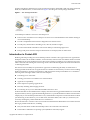
Pocket ACE Guide From the ACE Master, administrators create an ACE package that is distributed to end users using download, DVD, CD, USB Flash drive, or other media. See Figure 1 for a diagram of ACE package distribution. Figure 1. ACE Package Distribution ACE 2 Enterprise Edition is used across the enterprise to: Ensure secure controlled access to enterprise resources from a standardized PC environment running an ACE virtual desktop. Provide a simplified end‐user interface designed for non‐technical users. Provide policy‐based controls including access, network, and device rights. Provision time‐limited locked‐down ACE virtual desktops on unmanaged guest PCs. Encrypt and protect sensitive enterprise information for safe deployment to mobile users. Introduction to Pocket ACE Reducing risk and providing more secure desktop solutions continue to be top priorities for IT organizations. Workplace trends such as flexible schedules, work from home, and real estate consolidation lead to increased user mobility. Even as user mobility increases, there is still a need for providing access to enterprise resources, while at the same time reducing the risk of losing sensitive data and suffering network attacks from unknown or unmanaged systems. The increase in user mobility has spawned new approaches to addressing the ability of mobile users to leverage portable media devices. IT organizations have a number of solutions they can choose from including desktop virtualization, application virtualization, and solutions that attempt to blend the two. Consider the following when selecting a mobile solution for the enterprise: Preventing lost or stolen data. Isolating your instance from unknown or untrusted hosts. Application compatibility. Effort required to repackage applications. Remotely disabling and managing instances. Provisioning an easy‐to‐use and understandable solution for users. Pocket ACE enables an ACE Administrator to deploy ACE instances using portable media devices such as USB keys (flash memory drives), Apple iPod mobile digital devices, or portable hard drives. When an ACE instance is deployed, you can attach the portable device to any x86‐based host computer to run the ACE instance. When you finish using an ACE instance, you can shut down, detach the media, take it with you, and restart your session by attaching the portable media device to another host. Because Pocket ACE is a feature of ACE 2, it includes several benefits that differentiate it from other solutions that target portable media devices, including: Fully isolated virtual machine based desktops that work connected or disconnected. The broadest combination of operating system (Windows and Linux) support. Copyright © 2007 VMware, Inc. All rights reserved. 2