1
Section 12 — Sequencing/MIDI Applications
3.
TS-12 Musician’s Manual
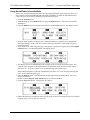
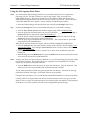
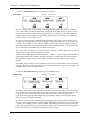
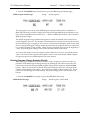
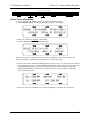
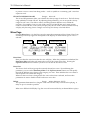
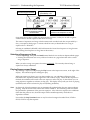
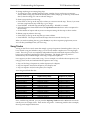
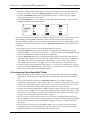
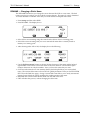
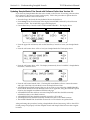
Press the Up Arrow button to enter General MIDI mode.
If the sequencer is running, the SEQUENCER MUST BE STOPPED message will be
displayed. If the sequencer is stopped, the “SAVE CHANGES?” prompt will be displayed (if
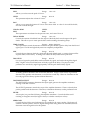
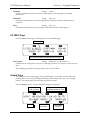
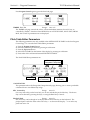
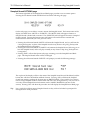
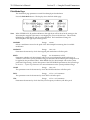
necessary). Otherwise, the following prompt will be displayed:
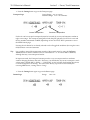
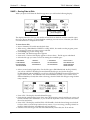
4.
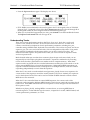
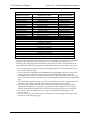
Pressing the soft button beneath *NO* will leave the TS-12 system unchanged, returning you
to the first MIDI Control sub-page.
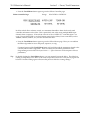
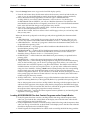
5.
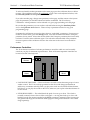
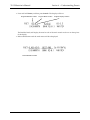
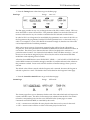
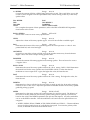
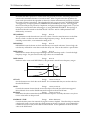
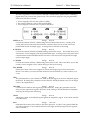
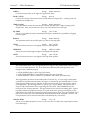
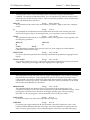
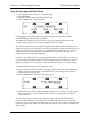
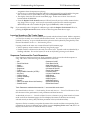
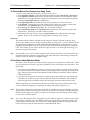
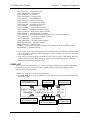
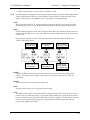
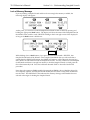
Pressing the soft button above *YES* will enable General MIDI Mode. All LEDs will be off
and all buttons (except the Arrow buttons and the soft buttons) will be disabled. The TS-12
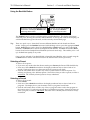
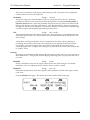
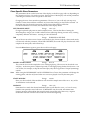
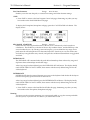
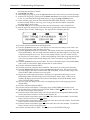
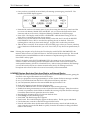
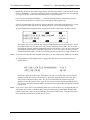
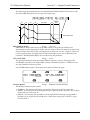
will display the General MIDI Mode page as follows:
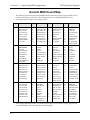
Press here for
GM-PANIC RESET
General MIDI
Track/Channel Number
MIDI reception
ON/OFF
General MIDI
Program Number
Press here to
exit GM Mode
General MIDI
Sound Name
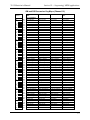
The TS-12 behaves as though an enlarged 16-track sequence has been selected, and as though the
current MIDI Mode=MULTI. Incoming MIDI will be received on all 16 MIDI channels, to 16
discrete inbound Track/Channels. The default effect algorithm (46 CHORUS + REVERB 2) will
be installed, and all Track/Channels will be routed through the effect.
When you now run the external computer or hardware sequencer, you will hear the proper
sounds played from the TS-12 as program changes and note/controller data is transmitted to the
TS-12 via the MIDI In jack.
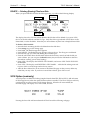
MIDI Out in General MIDI Mode
The TS-12 keyboard will always play the sound assigned to the currently displayed
Track/Channel number. Local playing on the TS-12 keyboard and controllers will be transmitted
via the MIDI Out jack on the displayed MIDI Channel number. This allows you to connect the
TS-12 MIDI Out jack to the MIDI In jack of a computer sequencer/hardware sequencer/other
MIDI Sound module.
This feature adds MIDI Controller capability to the TS-12 while in General MIDI Mode.
16