1
SD-AT1000W
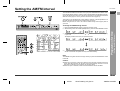
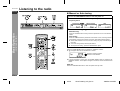
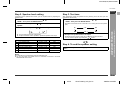
" Memorising a station
You can store 40 AM and FM stations in memory and recall them at the push of a button. (Preset tuning)
Perform steps 1 - 3 in "Manual or Auto tuning" on page 19.
1
2
Press the TUNER PRESET ( or
tion.
2
Within 5 seconds, press the TUNER
PRESET ( or ) button to select
the preset channel number.
Within 5 seconds, press the ENTER
button to store that station in memory.
" To erase all the contents of the preset
memory
1
2
3
3
Frequency and frequency band
Press the ON/STAND-BY button to turn the power on, and press the TUNER/
BAND button.
Hold the CLEAR button down for 3 seconds or more.
Whilst "CLEAR" is flashing, press the ENTER
button.
Repeat steps 1 - 4 to set other stations, or to change a preset station.
When a new station is stored in memory, the station previously memorised will
be erased.
- Listening to the radio -
Store the stations in memory, in order, starting with preset channel 1.
5
) button to select the desired sta-
Press the ENTER button to enter the preset tuning saving mode.
Preset channel
4
1
Press the TUNER (BAND) button.
Basic Operation
1
2
3
ENGLISH
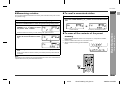
" To recall a memorised station
4
5
6
Note:
The backup function protects the memorised stations for a few hours should there be
a power failure or the AC power lead disconnection.
7
8
E-20
04/7/9
SD-AT1000W_LAG_E3.fm
TINSZA121AWZZ