1
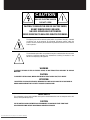
WARNING
If a fault occurs, first check the points listed below before
taking the set for repair.
Under no circumstances should you try to repair the
CD player yourself as this will invalidate the
guarantee.
If you are unable to solve a problem by following this
checklist, consult your dealer or service center.
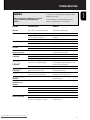
Problem
Possible cause
Solution
No power
Mains cable is not securely connected.
Connect mains cable properly.
No or bad sound
Volume is too low.
Interference caused by electric equipment
like TVs, computers, engines, etc.
Adjust volume.
Keep the CD player away from electrical
equipment.
Loose or wrong connections.
Volume is too low.
Headphone plug is dirty.
Volume is too low.
Connect the CD player correctly.
Adjust VOLUME –/+.
Clean headphone plug.
Adjust VOLUME –/+.
Loose or wrong connections.
Electrostatic discharge.
Connect the CD player correctly.
Disconnect the CD player from mains,
reconnect after a few seconds.
Insert a CD.
No or bad headphone
No or low quality
recording
No reaction to
operation of any keys
INSERT DISC
is displayed
DISC NOT
FINALIZED
is displayed
WRONG TRACK
is displayed
0 0:00 is displayed
VOLUME FIXED is
displayed
Some CD-Text track
information is not
displayed
CD skips tracks
Remote control does
not function properly
No CD is inserted.
The CD is badly scratched or dirty.
The CD is inserted upside down.
The CD-RW (or CD-R) is not properly recorded
for the use on a standard CD player.
English
TROUBLESHOOTING
Too much information on the CD-Text disc.
Replace or clean the CD.
Insert CD with label upwards.
Read the instruction booklet of your
CD-Rewriteable (or CD-Recordable) recorder
on how to finalize a recording.
Replace or clean the CD.
Key in a track number within the range of the
track numbers on the CD.
Choose a recording media with a recording time
longer than the first track of the CD.
Press EDIT for more than 2 seconds to
unlock the volume.
Use a CD-Text disc with less information.
SHUFFLE
or PROGRAM is active.
The CD is badly scratched or dirty.
Switch off SHUFFLE or PROGRAM play.
Replace or clean the CD.
Laser lens is dirty.
The laser lens is steamed up.
Batteries are inserted incorrectly.
Clean with a commonly available cleaning CD.
Wait until the lens has cleared.
Insert batteries correctly.
Batteries are flat.
Distance to the CD player is too large.
Insert fresh batteries.
Reduce distance.
The CD is badly scratched or dirty.
Chosen track number is higher than the
highest track number on the CD.
First track of the CD is longer than the first
side of the chosen recording media.
Volume is locked.
Downloaded From Disc-Player.com Marantz Manuals
13