1
Contents
Front panel
Important safety instructions
Before washing for the first time
Loading the dishwasher
Using the dishwasher
Settings
2
3
4
5
8
11
Care and maintenance instructions
Troubleshooting
Technical information
Service
Program chart
Notes
14
16
19
20
21
22
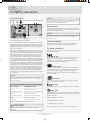
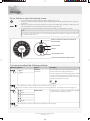
Front panel
The panel is fitted with touch buttons with audible feedback (see the chapter Settings).
4
5
12
6
3
14
START
STOP
7
2
PROG
1
8
11
18
15
16
9
10
13
17
1
Program selector
7
Rinse & Hold
13
Display
2
Heavy wash
8
Time set (for the Time program)
14
Delayed start
3
Sanitation wash
9
High temperature
15
Child lock (button lock)
4
Normal wash
10
Long dry
16
Salt indicator
5
Eco wash
11
Time saver
6
Time program
17
Rinse aid indicator
12
Start/Stop
18
TAB (3-in-1/all-in-one detergent)
NOTE!
• Two minutes after the last button press, the display enters left-on mode to save energy. The display brightness is reduced. Press
the Program selector once, or one of the option buttons, to reactivate the display.
2
Customer Care Center 1-800-898-1879
www.askona.com