1
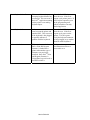
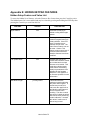
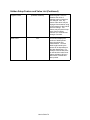
Setup Feature and Value List (continued)
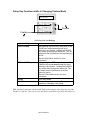
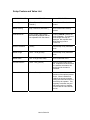
Emulation Mode
[ PAL, ASCII, Hex, Display ]
Selects active emulation. ASCII
emulation is a basic text
emulation. Hex and Display
emulation's are used for printing
data in a format which shows
the exact data being received by
the printer. This is useful trouble
shooting communications or
host programming issues.
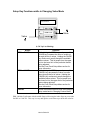
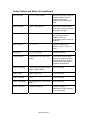
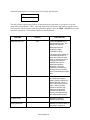
Date
[MM/DD/YYYY]
If RTC option is installed, this
feature allows the date to be set.
Press the Cancel key to select
Month/Date/Year to modify.
Press FEED+PAUSE or
FEED+CANCEL to modify then
press Cancel again to select
next parameter. When the full
date is displayed the change is
complete.
Time
[HH:MM:SS]
If RTC option is installed, this
feature allows the time to be set.
The hour is set in 24 hour format
(0-23). Press the Cancel key to
select Hour:Minutes:Seconds to
modify. Press FEED+PAUSE or
FEED+CANCEL to modify then
press Cancel again to select
next parameter When the full
time is displayed the change is
complete.
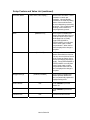
[Enabled, Disabled]
If RTC option is installed, this
feature specifies whether the
time is automatically updated for
Daylight Savings time.
Daylight Savings
Print Features
N/A
Press CANCEL to print the
feature list.
Print Test Label
N/A
Press CANCEL to print a test
label.
Firmware Rev.
N/A
Firmware P/N and revision
User's Guide 38