1
CHAPTER 7
Security Features
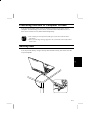
This chapter describes how to protect your computer against unauthorized use,
computer viruses and theft.
Passwords
Setting a password will help protect against unauthorized access to your computer.
When a password is set and the computer is turned on, resumes from Hibernation, or
enters the Setup utility, the system will require a password.
If you lose your password, you will be unable to access the computer or
change the configuration. Make sure you select a password you will
never forget, and write it down and save it in a secure place. Otherwise,
you will have to contact your dealer for assistance.
System Password
When the system password is set, the system will require the password when the
system enters the Setup utility. Set Password On Boot to Enabled if you want your
computer to ask your password when the system starts.
If you enter a wrong system password three times, the message System
Disabled appears. In this case, press the power switch to turn off the
computer; then, after 10 seconds, turn it on.
Setting/Changing the Password
7-1
7