1
a
=
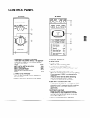
OPERATION OF CONTROL PANEL (R-2S58)
The operation
control panel.
An entry
In addition
of the oven is controlled
signal
tone should
by pressing
be heard
the appropriate
each time you press the control
the oven wil! beep for approximately
when a cooking procedure
pads arranged
2 seconds
on the surface
panel to make
a correct
of the
entry.
at the end of the cooking cycle, or 4 times
is required.
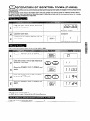
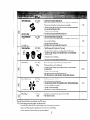
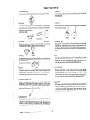
Plug the oven into a power
switch on the power.
point
and
1
I
I I
Flashing
121 Close
3
as above
the oven door.
Press the STOP/CLEAR
oven beeps.
eights
pad so that the
cl
Onlythedotswill
* To enter the present
time of day 1 I:34 (AM or PM).
Press the POWER LEVELOSERVE
for 3 seconds.
1
remain.
pad
I
Enter the correct time of day (hours)
pressing TIME pads.
2
by
(z)(z)
Press the POWER LEVEL@ /SERVE
again.
3
pad
-r
::
POWER
LEVEL 0
SERVE
I
I I nn
I
1
1
uu
I’
34
Enter the correct time of day (minutes)
by pressing TIME pads.
4
I
i
Press the POWER LEVELOSERVE
again.
x3
pad
I
POWER
LEVEL 0
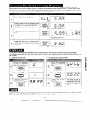
Use the STOP/CLEAR pad to:
1. Stop the oven temporarily
during cooking.
2. Clear if you make a mistake during programming.
Press the STOP/CLEAR
pad twice.
6
SERVE
x4j
I
-
I
I
I*