1
Removing Shipping Materials
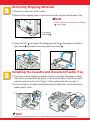
1 Place the machine on a flat surface.
2 Remove the shipping tapes on the machine and cassette/multi-purpose tray.
NOTE
• DO NOT remove the transparent USB label
at this stage
Transparent
USB label
Left side view
3 Open the ADF to remove the shipping material , then open the platen
glass cover to remove the inner protection sheet .
Installing the Cassette and Document Feeder Tray
1 Raise the cassette slightly toward the machine, and align the hooks on both
sides of the cassette with the guides in the machine, then install the cassette
into the machine as far as it will go 1. Then gently lower the cassette 2.
2 Insert the tabs on the document feeder tray into the holes on the document
feeder until it clicks.
2
1
2
1
NOTE
• Install the cassette so that there is no space between the cassette and the feeding slot.