1
English
3.1.7 Browser Mode
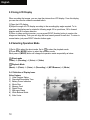
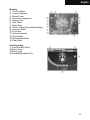
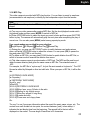
Set the shoot/playback mode switch to playback mode, then press (MODE) to switch to
browser mode, where you can quickly browse the photo, movie, voice and MP3 files you
have recorded.
a.) Use 5-direction button to select the file folder or a single file.
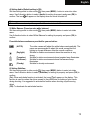
b.) To edit a file, you can select this file and then press RIGHT button. An icon “√ ” will be
shown on the display to prompt that the file is selected.
c.) You can press (MENU) button and 5-direction button to execute following operations
toward this file.
(DELETE): To delete the file.
(LOCK): To lock or unlock the file.
(COPY): To copy and edit the file.
26