1
3. Setting the Time and Date
If the watch is provided with a cover, open the cover to set the time or date, and
then close the cover once the time or date has been set.
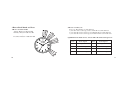
Seconds (number of years
elapsed since the most
recent leap year and month
during date correction)
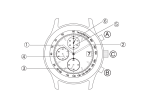
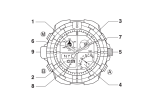
BUTTON(A)
CITIZEN
(0) Normal position and
time difference
correction position
(1) Date correction position
7
(2) Time setting position
Date
[Setting the Time]
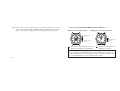
1. When the crown is pulled out to the second click (time setting position), the
second hand rapidly advances to the 0 seconds position and stops.
Note: Align the hands at the reference position after performing the all-reset procedure when the second hand does not stop at the 0 seconds position.
2. Turn the crown and set the time.
6
(1) When the crown is turned to the right, the hour and minute hands move
forward (clockwise).
(2) When the crown is turned to the left, the hour and minute hands move backward (counter-clockwise).
* Turning the crown continuously causes the hands to advance rapidly. Turn the
crown to either the left or right to stop the hands from advancing rapidly.
Note (1): When correcting in the forward direction, the date changes when the
hour and minute hands indicate 12:00 AM. However, when the date is
changed in the case the hands are advancing rapidly, the hour and minute
hands pause at 12:00 AM and then resume advancing rapidly after the
date has changed.
(2): When correcting in the backward direction, the date does not change
even if the hour and minute hands pass 12:00 AM.
3. Return the crown to the normal position in synchronization with a telephone
time signal or other time service.
7