1
7.6
DESIGN ELEMENT MOUNTING
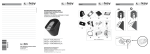
Installing the design element is
done by snapping it over the integra
finger scanner as follows: using two
fingers, grab the design element
on the sides from the middle. Align
and insert the design element
bottom two notches in the scanner
two bottom holes.
While the bottom edge of the
design element is in this position,
apply little pressure on the top face
towards the scanner forming a little
curve (avoid bending the plate).
While in this position, align the
notches on the top edge of the
design element into the scanner
two top holes. Once seated release
r
your fingers and the design
element is in place.
7.7
DESIGN ELEMENT DISMOUNTING
In order to dismount the design
element, use a flat object (flat
screwdriver or the like) and lift the
design element out of the frame
carefully, by placing the flat object
in-between
between the upper or the lower
edge of the plastic housing and the
design element.
element
50