1
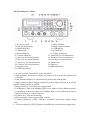
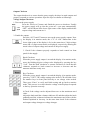
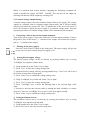
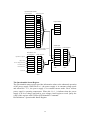
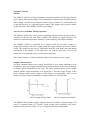
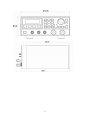
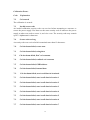
The Front Panel at a Glance
1. AC power switch
3. Earth ground terminal
5. Output on/off key
7. Control knob
9. Menu setting key
11. Current setting key
13. Store key for second function
15. Error key for second function
17. Secure key for second function
19. Clear key for second function
21. Display screen
23. REM annunciator
2. Sense terminals
4. Supply output terminals
6. Left/Right key
8. Up/Down key
10. Voltage setting key
12. Switch key for second function
14. Recall key for second function
16 Local key for second function
18. Number key
20. Enter key
22. ERR annunciator
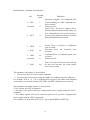
1. AC power switch: Turns the AC power on and off.
2. Sense terminals: Tests remote voltage, the positive pole is in red, the negative pole
is in black.
3. Earth ground terminal: It is connected to the chassis and earth ground.
4. Supply output terminals: Supply output, the positive output terminal is in red, the
negative output terminal is in black.
5. Output on/off key: Turns the power supply on/off.
6. Left/Right key: Moves the blinking digit to left or right, or selects different options.
7. Control knob: Adjusts the value of the blinking digit or selects different options by
turning clockwise or counter clockwise.
8. Up/Down key: Turns the menu page.
9. Menu setting key: Enters menu setting contents.
10. Voltage setting key (VSET): Displays or modifies the present voltage setting
value.
11. Current setting key (ISET): Displays or modifies the present current setting value.
3