1
Using the CardTalk Control Panel
7.
Choose Cancel when you have finished copying files.
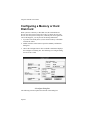
Configuring the CardTalk Control
Panel
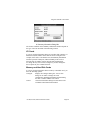
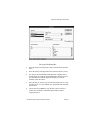
When you choose Options from the Edit menu, the CardTalk Control
Panel displays the Application Options dialog box.
The Application Options Window
This dialog box allows you to set the options discussed in the following
sections.
Popup Notification
These options determine when the Control Panel pops up to notify you
of PC Card events.
Disable
turns off popup notification of PC Card events.
This means the CardTalk Control Panel will not
appear when you remove or insert a card.
If you choose Disable, you can disable the Start
Minimized option.
Card Insertion causes the software to activate the CardTalk
Control Panel display when you insert a PC Card.
Card
causes the software to activate the CardTalk
Insertion/Rem
Control Panel display when you insert or remove a
ovalP
PC Card.
Page 72