1
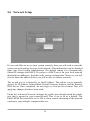
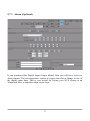
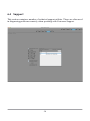
5.8.3 Scale Sensing (Optional) Scale Sensing is similar to Valve Sensing, however we do not interface with the PLC, but talk directly to the Scale just as your Apex system does. Select the type of scale indicator you will be using on this scale. Your scale indicator should be networkable. If it is not, then contact our Sales Department and they will instruct you on how to convert a traditional indicator into a network-able one. Once you have confirmed that the scale indicator is accessible via TCP/IP (the network), please enter the IP address and TCP Port that it can be accessed on. Below is a listing of the rest of the settings on this screen. These are the criteria used while monitoring the scale output to decide if and when to generate reports. Tare Minimum This is the minimum weight that we will use for a tare weight. This should be set high enough so anything smaller than a truck is not detected on the scale. Tare Maximum This is the maximum weight that the scale will read and still pass information to the NVS. Anything over this threshold will generate a possible Tare Contamination Report. We want to be certain that the trucks are empty before we add our product in as to not mix any product with the material from another company. Weight Decrease Limit When filling a truck on the scale, sometimes the weight will bounce up and down by small amounts 20-40 pounds. This setting determines the amount of weight decrease that should be considered as the truck having left the scale. The default settings is 1000 pounds. Ticket Weight Different Limit This refers to the maximum weight difference between the weight read from the scale and the gross weight field on the ticket. These weights may not always match since the driver may get out of the vehicle. The default is 500 pounds. 43