1
Chapter 2
NVS Introduction
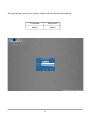
Once all connections have been properly made, press the power button located on
the front of the NVS system. When the system completes the self-test and normal
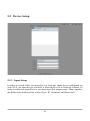
boot-up procedure, you are presented with a login screen. This login screen keeps
unauthorized persons from accessing your video information.
There are varying levels of access to your NVS system. By default, the admin
account has access to all features of the system.
11