1
Contents
List of Figures
ix
List of Tables xi
About This Guide xiii
Structure of This Guide xiv
Audience xv
Conventions xv
1.
Introducing the DLT2000XT Tape Drive and DLT2500XT Stacker 1
DLT2000XT Tape Drive and DLT2500XT Stacker Operation 3
Connection and Termination Guidelines 6
Special SCSI Requirements for Deskside Systems 7
2.
Installing the Sled-Mounted DLT2000XT Tape Drive 9
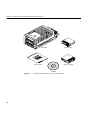
Checking Your Shipment 9
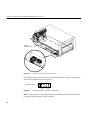
Checking and Setting the Drive’s SCSI ID 11
Inserting the Sled-Mounted DLT2000XT Tape Drive 13
Installing the DLT2000XT Tape Drive in a Deskside Challenge or Onyx
Drive Bay 14
Installing the DLT2000XT Tape Drive in Challenge XL and Onyx
Rackmount Systems 19
Installing the DLT2000XT Tape Drive in a Vault Rack 24
Configuring the Host System to Recognize the Sled-Mounted DLT2000XT
Tape Drive 27
Installing the SCSI Patch 27
3.
Installing the Desktop DLT2000XT Tape Drive 29
Selecting a Site 30
Checking Your Shipment 31
Checking and Setting the DLT2000XT Tape Drive’s SCSI ID
33
v