1
Table of Contents
Index
Table of Contents
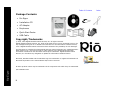
• Package Contents .......................... ii
• Copyright/Trademarks .................... ii
1 - Getting Started
Welcome ..................................... 1
• Learning More............................... 1
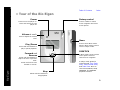
Tour of the Rio Eigen .................. 2
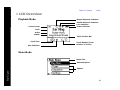
LCD Overview ............................. 4
• Playback Mode .............................. 4
• Menu Mode .................................. 4
• Date View .................................... 5
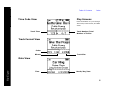
• Time Code View ............................ 5
• Track Format View ......................... 5
• Play Screens................................. 5
2 - Connections
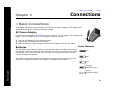
Basic Connections ....................... 6
• AC Power Adapter .......................... 6
• Batteries ..................................... 6
• Earphones ................................... 7
• USB ........................................... 7
• Additional Accessories ..................... 8
Rio Eigen
3 - Software Setup
Software Installation .................. 9
• Rio Music Manager ....................... 10
4 - Basic Operations
Basic Operations ....................... 11
Copy ......................................... 12
• Copying Tracks with Rio Music Manager12
Transfer .................................... 13
• Rio Music Manager ....................... 13
Control...................................... 14
Play .......................................... 15
• Play All ..................................... 16
• Album....................................... 16
• Artist ........................................ 16
• Genre ....................................... 17
• Track ........................................ 17
• Year ......................................... 17
• New Music ................................. 18
• Playlist ...................................... 18
5 - Advanced Features
Advanced Features ................... 19
Equalizer .................................. 20
• Custom ..................................... 20
• Normal ..................................... 20
• Rock ........................................ 21
• Jazz ......................................... 21
• Classical .................................... 21
• Pop .......................................... 22
• Trance ...................................... 22
Bookmarks ............................... 23
Stopwatch ................................ 24
Settings .................................... 25
iii