1
EDVR Quick Setup Guide
A. Check System Components
American Dynamics EDVR Unit
Supplied Accessories
Two Power Cords:
(1) North American standard
(2) Continental European standard
CD-ROM (Viewer software and
user documents in electronic form)
and this printed Quick Setup Guide
Power Brick
(External Power Supply)
Rack Mount Kit
Alarm I/O Adapter
Required Items
• Composite Monitor (PAL or NTSC)
• Cameras and BNC Cables
B. Connect Devices to Rear Panel
If a computer is available, you may want to view the Installation and Operation Guide as you set up
your EDVR (included on the CD-ROM).
1 Remove all items from the carton. If anything is missing or broken, please inform Customer
Service immediately.
2 Save all cartons and packing materials to use for shipping or transporting EDVR.
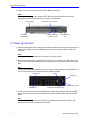
3 Connect the main monitor to the Main Monitor BNC connector.
1