1
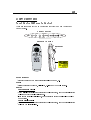
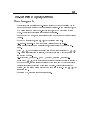
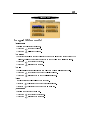
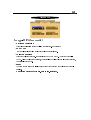
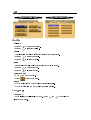
15 On-Screen Display Menus English How to operate 4The Projector has a multilingual On-Screen Display(OSD) menus that allow you to make image adjustments and change a variety of settings. In computer source, the OSD will be the Computer OSD. In video source, the OSD will be the Video OSD. The projector will detect the source automatically. 4To open the OSD menu, press the Menu button on the Remote Control or Panel Control. key to select main menu. 4 When OSD is displayed, press E.g.:Image-IgImage-IIgAudiogLanguagegManagementgImage-I... While making selection on a particular page, press Enter key to go into submenu. key to select the required item and adjust the settings by 4 Press key. When a specified item is selected, the color of the item will change from yel lowish brown to blue. E.g.:BrightnessgColor Temp.gZoomgContrastgKeystonegBrightness... key to adjust the parameter or required function in the items 4 While using of the submenu, confirm all the functions of the main menu by pushing Enter button after all/part of the items have been modified. Press Enter button to confirm, and the screen will be back to the main menu at once. Only key is enabled now. 4To exit the OSD, press the Menu button again.