1
ZN10_14 IB_060807.fh10 2/12/08 10:12 AM Page 3
quick start
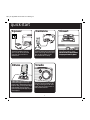
1:power
2:antenna
3:insert
Attach AC adaptor plug to
jack on back of the unit and
plug the other end into a
wall socket.
Snap AM antenna into provided
stand, then plug antenna cable
into socket on back of unit.
Move antenna 12” away.
Place Zune insert in dock.
Never dock a Zune without
the proper insert in place.
4:Zune
5:radio
FM
Insert a Zune® into the dock with
proper insert (Zune must not be in
a skin or case). The Zune will charge
while docked. Turn the Function
knob to Zune and press play on your
Zune to play it .
Turn the Function knob to AM
or FM to select AM or FM radio
band. Turn the Tuning knob to
desired radio station.
1