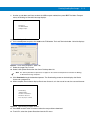
1
9-4
Symbol MT2070/MT2090 Integrator Guide
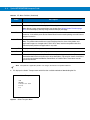
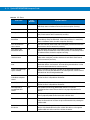
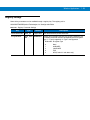
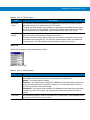
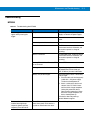
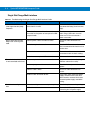
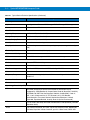
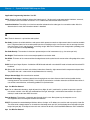
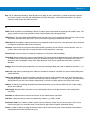
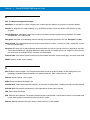
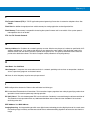
Table 9-1 Troubleshooting the MT20X0 (Continued)
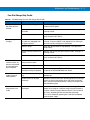
Problem
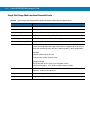
Device emits aiming pattern, but
does not decode the bar code.
Possible Causes
Possible Solutions
Device is not programmed for the
correct bar code type.
Program the device to read that type of
bar code. Refer to the MT2090/MT2070
User Guide (p/n 72E-117859-xx) for
more information.
Bar code symbol is unreadable.
Scan test symbols of the same bar
code type to determine if the bar code
is defaced.
The symbol is not completely inside
aiming pattern.
Move the symbol completely within the
aiming pattern.
Scan window may be dirty.
Clean the scan window.
See Maintenance on page 9-1.
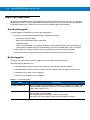
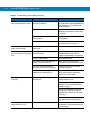
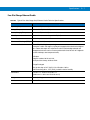
Device emits 4 short high beeps
during decode attempt.
Device has not completed USB
initialization.
Wait several seconds and scan again.
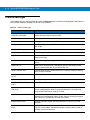
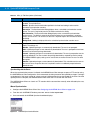
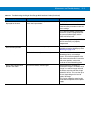
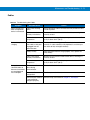
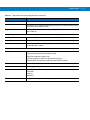
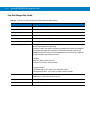
Device decodes bar code, but
does not transmit the data to the
host.
Device is not programmed for the
correct host type.
Scan the appropriate host type
programming bar code. See the
chapter corresponding to the host type.
Interface cable is loose.
Re-connect the cable.
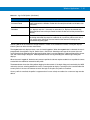
If the device emits 4 long low beeps, a
transmission error occurred.
Set the device's communication
parameters to match the host's setting.
If the device emits 5 low beeps, a
conversion or format error occurred.
Configure the device's conversion
parameters properly.
If the device emits low/high/low beeps,
it detected an invalid ADF rule.
Program the correct ADF rules. Refer
to the Advanced Data Formatting
section of the User Guide.
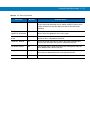
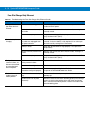
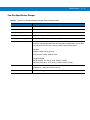
Device is not programmed to work
with the host.
Scan the appropriate host type
programming bar code.
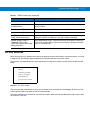
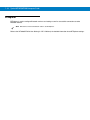
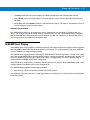
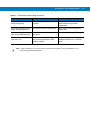
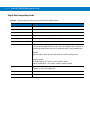
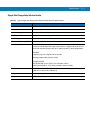
Host displays scanned data
incorrectly.
For RS-232, set the device's
communication parameters to match
the host's settings.
For a Keyboard Wedge configuration,
program the system for the correct
keyboard type, and turn off the CAPS
LOCK key.
Program the proper editing options
(e.g., UPC-E to UPC-A Conversion).
Device emits high/high/high/low
beeps when not in use.
RS-232 receive error.
Normal during host reset. Otherwise,
set the device's RS-232 parity to match
the host setting.