1
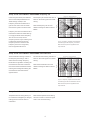
Setup: Sound: Sound Adjustment: Volume
This menu displays the current volume
setting on a scale of 0 to 90 in 1 dB steps.
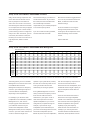
Setup: Sound: Sound Adjustment: Max Volume
The Max Volume is the highest volume
Range: 0 to 90.
setting that is allowed in normal usage.
Step Size: 1.
This can be used to limit the maximum
output of the television.
Setup: Sound: Sound Adjustment: Headphones
Different brands and models of
For example, if you have headphones
headphones produce different output
with a high sensitivity, then they will
levels depending on their ‘sensitivity’.
sound louder than your loudspeakers at
The Headphones menu allows you to
the same volume setting. Therefore the
make adjustments for this sensitivity.
headphones’ value should be turned
down to offset the headphone output
to a lower level, matching the
loudspeakers’ outputs.
Setup: Sound: Sound Adjustment: Eco Mode
When the Eco Mode is turned on, then
Note that the behaviour of the Eco
assignments. So, if you are watching
loudspeakers that are not currently in
Mode setting is also dependent on the
television, only two loudspeakers will be
use will be switched off automatically by
input signal. For example, if you have a
switched on. If you then switch to a DVD,
the television. If Eco Mode is off, then all
7.1 loudspeaker configuration and the
then 5 of your main speakers and your
loudspeakers associated with the current
Processing (under Sound Modes:
subwoofer will switch on.
Speaker Group will be switched on by
Advanced Settings: Spatial Controls) is
the television.
set to 1:1, the loudspeakers that are
currently switched on, are those that are
associated with the input channel
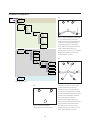
Setup: Sound: Sound Modes: Adaptive
The Adaptive mode is, in fact, not a
Sound Modes available for selection by
sound mode. Rather, it is an auto-
the Adaptive setting are: Movie, Game,
selector that chooses the best sound
Speech, Drama, Sports, Music.
mode from the list below using
metadata in the signal stream (in the
case of DVB) or for a given source (i.e.
Blu-ray player, PC, game console etc.).
3