1
on test
Dave Smith Instruments Pro 2
Round The Back
In addition to its quarter‑inch stereo audio
outputs and the associated headphone output,
the Pro 2 offers an Audio In that accepts a wide
range of signals and injects them into the
internal signal path via the oscillator mixer.
You can also derive control signals from the
external signal using the associated Gate
extractor and Envelope Follower. But if no
cable is plugged into this socket, its Level and
Gain controls determine the amount of final
output signal that’s internally fed back into the
mixer, emulating an old Minimoog trick used to
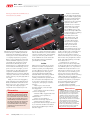
Each filter has a dedicated contour
generator to control its cutoff frequency.
From the control panel, you can treat each
as a bipolar ADSR, but the menus provide
access to a delay before the onset of the
Attack (making each contour a five‑stage
HADSR), plus velocity sensitivity for the
contour amount. Naturally, the contour
rates can be modulated, and there’s
also a Repeat mode that loops the HAD
stages. In short, there’s a huge amount of
flexibility here.
Turning to the
filters themselves, you
could describe these
with no little accuracy
as ‘Prophet‑y’ (Filter
1) and ‘Oberheim‑y’
(Filter 2) and, if you
send a simple signal
through one or the
other in isolation, that
gives you a reasonable idea of what to
expect. However, the real flexibility lies
in the simultaneous use of both. Imagine
passing one waveform through Filter 1
with one combination of cutoff frequency,
resonance, key‑tracking, contour and
modulation parameters, and passing
a second through Filter 2 with a different
profile and a different set of parameters;
you can obtain two very different sounds,
and the possibilities for layering and
otherwise combining them are huge. You
can even create D50‑style ‘SAS’ patches
with one timbre for the attack phase and
thicken the sound or cause screaming chaos.
Inputs for a footswitch and expression pedal
are also provided and, sandwiched between these
and the audio I/O, you’ll find no fewer than four
CV Ins and four CV Outs as well as a Gate Out,
all on 3.5mm sockets. I would have preferred
these to be quarter‑inch too, but DSI appears to
be looking toward the Eurorack market here, as
evidenced by its own DSM01 filter module.
Digital control is provided by a bi‑directional,
class‑compliant USB port (MIDI only, not
audio) and three five‑pin DIN MIDI sockets
a different one for the body of the sound.
The only obvious limitation is that you
can’t push Filter 2 into self‑oscillation.
That’s a shame, but not a problem.
The next stage in the signal path is an
output boost that can drive, overdrive, or
even distort the filtered signal before it’s
passed to the audio amplifier. This also
has a dedicated contour generator that, at
first, appears to echo that of the Prophet
12. But, while the velocity‑sensitive,
looped HADSR structure is retained,
labelled In, Out and Thru/Out2, the action
of the last of which is defined by a Global
parameter. As you would expect, the Pro 2 offers
extensive MIDI capabilities, and the largest
section of the manual (nearly 40 pages!) is
dedicated to NRPNs which, as well as mapping
all the controls, include such things as the
values in each of the steps in each of the tracks
in a sequence.
Finally, there’s an IEC socket for the synth’s
internal, universal (50/60Hz, 100‑240V AC)
power supply.
you add drive, drive and yet more drive...
well, if you like to listen to synths scream,
this is one way to make them do it.
You can now pass the analogue
signal unmolested to the final output,
which comprises a fourth overdrive and
a master volume control. Happily, even
at maximum distortion and level, the
Pro 2 doesn’t suffer from the oscillator
leakage that made its way to the outputs
of the Prophet 12, and the signal/noise
ratio is remarkable given the number
of gain/overdrive
stages available. But
if you’re willing to
allow the digital side
of the Pro 2 to do
its thing, the Delay
section — which sits
between the amplifier
and the output
section — offers four,
sync’able delay lines. The legends on the
control panel imply that three of these
are digital, whereas the fourth (by use of
the name BBD) is analogue. In fact, all
are digital, although DSI claims that the
fourth has been programmed to emulate
an analogue delay. The manual states that
the maximum delay time is 1s, but that’s
wrong; the maximum for the BBD effect is
1.5s, and there’s an additional Long/Short
parameter in this to help you to create
modulation effects such as chorusing and
flanging. Inevitably, the results lack the
deep whoosh of an analogue stompbox
“I’m not going to delve into the clichés
regarding screaming leads and thunderous
basses, or all the other hackneyed phrases
used to describe monosynths, because it’s
capable of so much more than that.”
102
there’s a huge difference: where the
polysynth has a Pan parameter that allows
you to spread its 12 voices across the
stereo soundstage, the monosynth has
another distortion circuit that can add yet
another level of overdrive to your sound.
Interestingly, the tunable feedback loop
following the amplifier — which takes the
analogue signal, converts it to digital,
and then injects it back into the Character
effects section — is also different from
before. When ringing, it will track the
keyboard for another octave, and it has
a cleaner and more defined sound. But if
January 2015 / w w w . s o u n d o n s o u n d . c o m