1
4.11
NOTE: IF THE REGULATION IS NOT ENABLED THE CONTROLLER DISPLAYS “PMP”.
RS485 SERIAL LINE
6.2
All models can be connected to the monitoring and supervising system XWEB3000. If Mod=Std
standard ModBUS-RTU protocol is used, if Mod=AdU custom XWEB library is required. This last
configuration makes possible to use the same serial address of the thermostat that gives the cooling
request to XEV. In this way, it’s possible to reduce the number of addresses used.
6.3
4.12
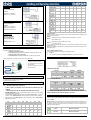
HOW TO: SEE THE SET POINT
1)
2)
CONNECTION OF XEC SUPERCAP (BACK UP BATTERY)
Press the SET buttons until the set point will be showed.
To come back to see temperature, wait about 5s or press newly SET key.
HOW TO: MODIFY THE SET POINT
To change the set point value operate as follows:
1)
Press the SET button until the set point will be showed.
2)
Use UP or DOWN buttons to change its value.
3)
Press SET button to store the new value.
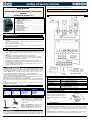
XEC Supercap is designed to be used with Dixell products (XM678D, XEV, IEV and others); to close
the stepper valve in case of power failure.
!!!!! IMPORTANT !!!!!
XEC Supercap and XEV22D must be powered by two different transformers; the failure of the
observance of this rule may result in damage to the XEC Supercap and / or the connected XEV22D.
6.4
HOW TO: ENTERING “PR1” PARAMETER MENU
To enter in “Pr1” level menu:
1) Pressing SET+ DOWN buttons for about 3
seconds.
2) Instruments shows first parameter in Pr1
menu
Wiring connection
XEV22D
Terminal 31 (+)
Terminal 30 (gnd)
XEC
Terminal 4 (12Vdc)
Terminal 3 (gnd)
6.5
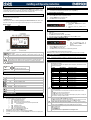
5. FRONT PANEL
HOW TO: ENTERING “PR2” PARAMETER MENU
To enter to “Pr2” parameters list:
1. Enter to “Pr1”.
2. Select “Pr2” parameter and press SET.
3. The “PAS” label will be shown, then “0--” with 0 blinking.
4. Insert “321” password through UP and DOWN buttons, then press SET to confirm.
6.6
HOW TO: CHANGE A PARAMETERS VALUE
To change the parameter’s value operate as
follows:
1.
Enter the Programming mode by
pressing the SET and DOWN button for
about 3s.
2.
Select the required parameter.
3.
4.
5.
%
PRB
Press the SET button to display the value.
Use UP or DOWN to change the value.
Press SET to store the new value and move to the following parameter.
To exit: Press SET + UP or wait 30s without pressing any button.
NOTE: the set value is stored even when the procedure is exited by waiting the time-out to expire.
To display and to modify the set point. In programming mode it selects a parameter or it
confirms a value.
Push to display pressione per visualizzare il valore apertura valvola 0..100% per
qualche secondo.
Una pressione per visualizzare il valore di pressione per qualche secondo.
By pressing and releasing this key, it’s possible to see the values of the probes.
In programming mode it slides the codes of the parameters or it increases their values.
In programming mode it slides the codes of parameters or it decreases their values.
7. PARAMETER LIST
NOTE:
REGULATION
FtY
KEYS COMBINATIONS
5.1
+
To lock or to unlock the keyboard
+
To enter programming mode.
XEV22D LEDS
On display there are some luminous dots. Their meaning is described in the following table:
LED
MODE
Function
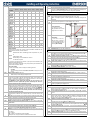
REFRIGERANT
r22
r134A
r404A
r407A
r410
r507
r407C
r407F
OPERATING RANGE
-50-60°C/-58÷120°F
-70-60°C/-94÷120°F
-50-60°C/-58÷120°F
-50-60°C/-58÷120°F
-50-60°C/-58÷120°F
-70-60°C/-94÷120°F
-50-60°C/-58÷120°F
-50-60°C/-58÷120°F
r290 – Propane
-50-60°C/-58÷120°F
ON
Maximum Operating Pressure alarm
290
OFF
Valve is completely closed
CO2
r744 - Co2
-50-60°C/-58÷120°F
450
r450A
-45-60°C/-69÷120°F
513
r513
-45-60°C/-69÷120°F
448
r448A
-45-60°C/-69÷120°F
449
r449A
-45-60°C/-69÷120°F
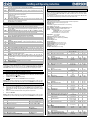
Reaction time (1÷100s; 0 = automatic time adjustment) time delay between valve
position adjustments.
It’s the time between the valve adjustment command and when the valve is moved.
EI
With rEt = 1 the valve is moved continuously,
with rEt = 10 the valve is moved every 10s,
with rEt = 0 the reaction time is calculated automatically by the system, according the
SH variation. The range is between 6÷60s,
Probe Error opening percentage: (0 to 100%) if a temporary probe error occurs, valve
opening percentage is PEo until PEd time is elapsed.
If PEO is different from 0 it assures cooling also with probe error, because even if the
device cannot calculate superheat the valve can work at PEo percentage.
Probe Error delay before stopping regulation: (0 to 239sec; 240=On=unlimited) if
probe error duration is higher than PEd, valve will close completely and “Pf” message
will be showed. With PEd=on, valve opening is PEo until probe error finishes.
Type of Stepper motor: (UP; bP) it permits to select the kind of valve.
UP = Unipolar valves;
bP = Bipolar valves.
!!!!! WARNING !!!!!
This parameter has to be adjusted before connecting the valve.
Valve is moving
Valve is completely opened
BLINKING
Serial communication present
OFF
Serial communication absent
ON
Superheat alarm
rEt
6. USER INTERFACE
4)
5)
6)
LABEL
R22
134
404
47A
410
507
47C
47F
Low pressure alarm
ON
2)
3)
Kind of gas: type of gas used by plant. This is a fundamental parameter for correct
functioning of all system.
The table below contains the refrigerant gases managed by the XEV22D and their
operating temperature
ON
BLINKING
6.1
All pressure parameters are relatives or absolutes depending on the PrM parameter.
FAST ACCESS MENU (DURING REGULATION)
Press and release UP button.
The variable available in the Fast access menu are:
a.
CLP Cooling demand percentage
b.
tP1 Temperature from Probe 1
c.
PPr Pressure value from Probe 2 transducer.
d.
tP2 Suction temperature obtained from pressure temperature table .
e.
SH
Value of superheat.;
f.
StH Superheat set point
g.
oPP Percentage of valve opening.
h.
d1S Free voltage digital input status
i.
d2S Main Voltage digital input status VAC
Brows parameter labels with UP or DOWN buttons.
Press SET to see read-only value. To change parameter, press SET.
To leave the fast access menu, press and release SET+UP or wait for time-out to expire (about
3 minutes).
1592025990 XEV22D GB r1.5 14.11.2014.docx
PEo
PEd
tEU
XEV22D
3/6