1
1
Explanation of Symbols and Safety Notes
1.1
Explanation of symbols ........................................................................... 5
1.2
Safety notes ............................................................................................ 5
2
Overview
2.1
Notes on the installation and operating instructions ............................... 6
2.2
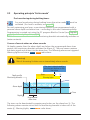
Operating principle "Active mode" . ........................................................ 8
2.3
Operating principle "passive mode" ........................................................ 10
2.4
Intended use ........................................................................................... 10
2.5
Package contents .................................................................................... 11
3
Using the System for the First Time
4
Installing the BlueFox System
4.1
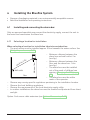
Installing and connecting the alarm box .................................................. 14
4.1.1
..............
............................................................................................
5
6
............................... 13
............................................ 14
Selecting a location for installation ............................................. 14
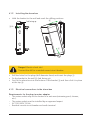
4.1.2 Installing the alarm box ............................................................... 15
4.1.3 Electrical connections to the alarm box ....................................... 15
4.2
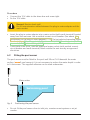
Fitting the pool sensor ............................................................................ 16
5
Alarm box operation
5.1
Operating modes .................................................................................... 19
5.2
Activating the "Active mode" ................................................................ 19
5.3
Activating the "Passive mode" ................................................................ 21
6
System settings
6.1
System tests and system settings . ........................................................... 22
6.2
Entering the PIN ...................................................................................... 27
2
.................................................................. 19
............................................................................. 22