1
Contents
Preface ............................................................................................................................................... 4
About SnapScan ......................................................................................................................... 5
Environmental Requirements...................................................................................................... 5
Precautions ................................................................................................................................. 6
Cleaning Your Scanner ............................................................................................................... 6
How to Use This Online Guide.................................................................................................... 7
How to Print This Guide .............................................................................................................. 7
Chapter 1: Preparing the Scanner................................................................................................... 8
Unpacking the Scanner............................................................................................................... 9
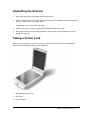
Taking a Closer Look .................................................................................................................. 9
Unlocking the Scanner .............................................................................................................. 10
Chapter 2: Installing the Scanner for PC...................................................................................... 12
Minimum System Requirements ............................................................................................... 13
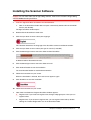
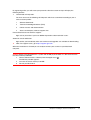
Installing the Scanner Software................................................................................................. 13
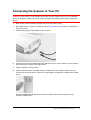
Connecting the Scanner to Your PC ......................................................................................... 15
Chapter 3: Installing the Scanner for Macintosh......................................................................... 16
Minimum System Requirements ............................................................................................... 17
Installing the Scanner Software................................................................................................. 18
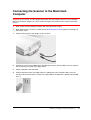
Connecting the Scanner to the Macintosh Computer ............................................................... 20
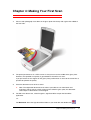
Chapter 4: Making Your First Scan ............................................................................................... 21
Appendix A: Troubleshooting ....................................................................................................... 23
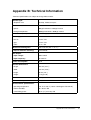
Appendix B: Technical Information .............................................................................................. 26
Appendix C: Regulation Compliance............................................................................................ 27
Safety Regulations .................................................................................................................... 28
UL Safety Statement.................................................................................................. 28
TÜV: Wichtige Sicherheitshinweise........................................................................... 28
Electromagnetic Compatibility................................................................................................... 29
Federal Communications Commission Radio Frequency Interference Statement.... 29
Industry Canada Class A and B Label Requirements ............................................... 29
Declaration of Conformity: SnapScan e10 ................................................................................ 30
Preface
3