1
Parts Identification
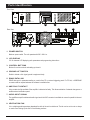
Front View
PUBLIC ADDRESS POWER AMPLIFIER ● QUANTUM POWER SERIES
1
2
10
Rear View
4
3
5
6
7
8
12
11
9
1. POWER SWITCH
Mains ac power switch. The unit operates with 220 - 240V ac.
2. LCD DISPLAY
2 X 18 character LCD displaying units parameters and programming instructions.
3. CONTROL BUTTONS
Buttons for various controls and setting up the unit.
4. GROUND LIFT SWITCH
Switch to isolate or link signal ground to equipment body.
5. RS485 DATA LINK
RS485 data port for parameter reading or controls from PC or external triggering panel. For PC link, a USB-RS485
converter shall be required whereas the software is available free.
6. AMP. FAULT CONTACT
A dry contact shall be available if the amplifier is detected as faulty. This allows activation of external changeover or
enable external notification panel.
7. AUDIO INPUT SIGNAL
The amplifier accepts line balanced audio signal and a link XLR connector is available to connect in parallel to the next
amplifier.
8. VENTILATION FAN
It is a variable speed temperature dependant fan with air blows from inside out. The fan can be set to auto or always
on mode. See “Setting Up the Unit” in the following sections.
PAGE 2
Quantum QP2000 Series Power Amplifiers