1
Operation Guide 5302
Selecting a Mode
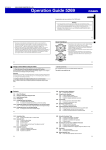
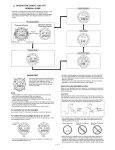
• The illustration below shows which buttons you need to press to navigate between modes.
• To return to the Timekeeping Mode from any other mode, hold down D for about two seconds.
• The mode dial hand indicates the watch’s current mode.
Timekeeping Mode
Stopwatch Mode
World Time Mode
Digital Compass Mode
Mode dial hand
Mode dial hand
Thermometer Mode
Alarm Mode
Countdown Timer Mode
Mode dial hand
E-8
E-9
General Functions (All Modes)
The functions and operations described in this section can be used in all of the modes.
Direct Timekeeping Mode Access
• To enter the Timekeeping Mode from any other mode, hold down D for about two seconds.
Auto Return Features
• The watch will automatically return to the Timekeeping Mode if you do not perform any button operation
for a particular amount of time in each mode.
Mode Name
Approximate Elapsed Time
Alarm, Digital Compass
3 minutes
Thermometer
1 to 2 minutes
Setting screen (digital setting flashing)
3 minutes
Digital Meters
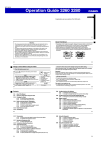
• The upper digital meter (Digital Meter A) indicates the seconds count in the Timekeeping Mode (page
E-12), World Time Mode (page E-38), and Timer Mode (page E-43). In the Stopwatch Mode (page
E-41) it indicates the 1/10-second count. While viewing bearing memory contents in the Digital
Compass mode (page E-27), it shows a bearing pointer.
• In all modes (except when a flashing setting screen is displayed), the lower digital meter (Digital Meter
B) shows the current Timekeeping Mode time (flashing) and World Time time (not flashing).
Example:
Digital Meter A
Initial Screens
When you enter the Alarm, World Time, or Digital Compass Mode, the data you were viewing when you
last exited the mode appears first.
Digital Meter B
WT
HT
WT: Current World Time time (London, 1:08 p.m.)
HT: Current Timekeeping Mode time (Tokyo, 10:08 p.m.)
Scrolling
The E and B buttons are used on the setting screen to scroll through data on the display. In most
cases, holding down these buttons during a scroll operation scrolls through the data at high speed.
E-10
E-11
Timekeeping
Configuring Home City Settings
Use the Timekeeping Mode to set and view the current time and date.
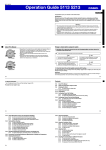
• Each press of A in the Timekeeping Mode will change screen contents as shown below.
• Digital Meter A shows the seconds count.
There are two Home City settings: actually selecting the Home City and selecting either standard time or
daylight saving time (DST).
Date Screen
Mode dial
hand
City code and city name
Time Screen
Day of week
Hour hand
Digital Meter A
Second hand
Minute hand
Digital Meter B
Month Day
To configure Home City settings
1. In the Timekeeping Mode, hold down A until ADJ appears in the
upper display.
• When you release A (after ADJ appears), SET will be flashing in
the lower display. This is the setting mode.
• The watch will exit the setting mode automatically if you do not
perform any operation for about two or three minutes.
2. Use E (East) and B (West) to scroll through the available city codes.
• Keep scrolling until the city code you want to select as your Home
City is shown in the upper display.
• For details about city codes, see the “City Code Table” at the back
of this manual.
PM
indicator
Hour :
Minutes
3. Press D.
• This will cause DST to appear in the lower screen and the DST
setting of the currently selected Home City to appear in the upper
screen.
Seconds
DST indicator
4. Press E to toggle the DST setting between daylight saving time (ON)
and standard time (OFF).
• Note that you cannot switch between standard time and daylight
saving time (DST) while UTC is selected as your Home City.
E-12
E-13
5. After all of the settings are the way you want, press A to exit the setting screen.
• The DST indicator appears to indicate that daylight saving time is turned on.
Note
• After you specify a city code, the watch will use UTC* offsets in the World Time Mode to calculate
the current time for other time zones based on the current time in your Home City.
* Coordinated Universal Time, the world-wide scientific standard of timekeeping.
The reference point for UTC is Greenwich, England.
To change the daylight saving time (summer time) setting
1. In the Timekeeping Mode, hold down A until ADJ appears in the
upper display.
• When you release A (after ADJ appears), SET will be flashing in
the lower display.
Configuring Current Time and Date Settings
You can use the procedure below to adjust the Timekeeping Mode time and date settings if they are off.
Changing the digital Home City data should cause the analog time setting to change accordingly. If the
analog time does not indicate the digital time, check the home positions of the hands and make
adjustments if necessary (page E-18).
To change the current time and date settings
1. In the Timekeeping Mode, hold down A until ADJ appears in the
City code
upper display.
• When you release A (after ADJ appears), SET will be flashing in
the lower display.
2. Press D.
• This will cause DST to appear in the lower screen and the DST
setting of the currently selected Home City to appear in the upper
screen.
3. Press E to toggle the DST setting between daylight saving time (ON) and standard time (OFF).
4. After all of the settings are the way you want, press A to exit the setting screen.
• The DST indicator appears to indicate that daylight saving time is turned on.
E-14
E-15