1
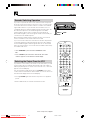
DVD Audio Connections
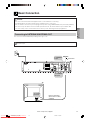
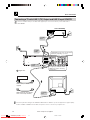
Connecting a TV Equipped with S-VIDEO Input Jacks
When you want to achieve a better video image by connecting a TV equipped with an S-VIDEO input connector
to the Unit, you should use an S-VIDEO lead (commercially available) to connect the TV to the Unit.
Please note, if the Output Selector Switch is set to RGB, no signal will be output from the S-VIDEO
socket.
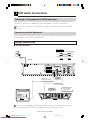
Connecting to Audio Equipment
Connecting the Unit to audio equipment provides normal stereo sound plus powerful stereo sound enhanced
by Dolby Digital (5.1 channel), DTS, and MPEG Audio.
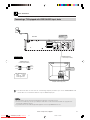
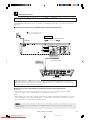
Playing 2 channel audio
■ Analogue Connection
Required lead
VIDEO/AUDIO lead (commercially available)
White (L)
White (L)
Red (R)
Red (R)
S-VIDEO lead (commercially available)
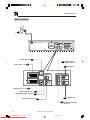
This Unit
S-VIDEO
LINE 2
VIDEO
RGB
DVD OUT
OUTPUT
SELECTOR
To AUDIO
VCR/DVD
OUT
OUT
jacks
DIGITAL
AUDIO
R
ANTENNA
IN
AUDIO
LINE 1 (TV)
(Red)
S-VIDEO
L
R
AUDIO
(White)
VIDEO
OUT
L
S-VIDEO lead
(commercially available)
To S-VIDEO
OUT jack
VIDEO/AUDIO lead
(commercially available)
To amplifier
audio input jacks
Jack and Plug Colours
Audio Left: White
Audio Right: Red
(White)
To S-VIDEO
input jack
(Red)
S-VIDEO
INPUT
Amplifier of stereo system, etc.
TV (with external input jacks)
If the Unit is set to OPERATE ON, the DVD signals will be output from the DVD OUT jacks at all times.
(The DVD signals will be output from the DVD OUT jacks also when using the VCR.)
22
DVNC65H019_024.pm6
Downloaded From Disc-Player.com
Sharp Manuals
www.sharp.co.uk/support
22
30/8/02, 11:14 am