1
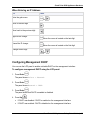
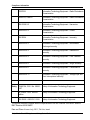
Check Point 4000 Appliances Hardware When Entering an IP Address To Press Enter the grub menu or Move to the next digit Move back to the previous digit Approve the change when the cursor is located on the last digit Cancel the IP change when the cursor is located on the first digit Change current digit or Configuring Management DHCP You can use the LCD panel to enable or disable DHCP on the management interface. To configure management DHCP using the LCD panel: 1. Press Enter . The panel shows Select > Network. 2. Press Enter . The panel shows Network > DHCP. 3. Press Enter . The panel shows that DHCP is enabled or disabled. 4. Press Up . If DHCP was disabled - DHCP is enabled on the management interface. If DHCP was enabled - DHCP is disabled on the management interface. Check Point 4000 Appliances Getting Started Guide | 33