1
1. INTRODUCTION
1.1 General Guidance
We recommend to program the PowerMax on the work
bench before actual installation. Operating power may be
obtained from the backup battery or from the AC mains.
The installer’s menu is accessible only to those who know
the installer’s code, which is 9999 by factory
default.
Obviously, you are expected to use this code only once for
gaining initial access, and replace it with a secret code
known only to yourself (see Section 2).
You will mainly use 5 control pushbuttons throughout the
entire programming process:
- to advance within a given menu.
- to retreat within a given menu.
- to go down one level in the programming
structure or to confirm data.
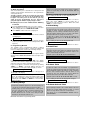
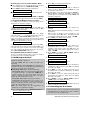
B. Click <OK> to select the installer’s mode. The control
panel will prompt you for the installer code.
C. Enter the valid installer code (9999) if this is the
first time you access the installer menu. The “Happy
Tune” will sound if the code is correct and the display
will change to:
1.NEW
INSTL
CODE
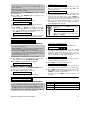
You have now gained access to the first item on the
installer menu. Detailed instructions on how to deal with
each item are given in sections 2 through 10 below.
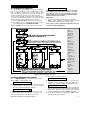
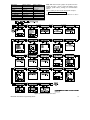
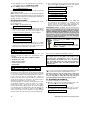
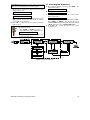
Note: At this point refer to Figure 2, which takes over
where Figure 1 leaves off.
D. Click <NEXT> to go up in menu item numbers and
<BACK> to go down in menu item numbers.
E. To quit the installer’s menu, click <AWAY>. This will
take you directly to “<OK> TO EXIT”.
F. Click <OK> to return to the normal operating mode.
- to go up one level in the programming structure.
- instant return to the installer menu (top level).
The sounds you will hear while programming are:
- Single beep, heard whenever a key is pressed.
- Double beep, indicates automatic return to the
normal operating mode (by timeout).
☺
- Happy Melody (- - - –––), indicates successful
completion of an operation.
- Sad Melody (–––––), indicates a wrong move
or rejection.
1.2 Accessing the Installer’s Menu
To access the installer’s menu and navigate within it,
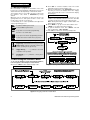
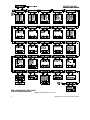
refer to Figures 1 and 2 and proceed as follows:
A. Click the <NEXT> button until the display reads:
INSTALLER
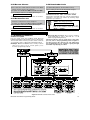
Figure 1. Gaining Access to the Installer’s Menu
MODE
Figure 2. Navigating within the Installer Menu
2
DE5450P PowerMax Programming Guide