1
Introduction
This document describes the command line tools of Tenable Network Security’s Nessus 6 vulnerability scanner. Please
email any comments and suggestions to support@tenable.com.
Tenable Network Security, Inc. is the author and maintainer of the Nessus vulnerability scanner. In addition to constantly
improving the Nessus engine, Tenable writes most of the plugins available to the scanner, as well as compliance checks
and a wide variety of audit policies.
Prerequisites, deployment options, and a walk-through of an installation are described in this document. A basic
understanding of Unix and vulnerability scanning is assumed.
Standards and Conventions
Throughout the documentation, filenames, daemons, and executables are indicated with a courier bold font such as
setup.exe.
Command line options and keywords are also indicated with the courier bold font. Command line examples may or
may not include the command line prompt and output text from the results of the command. Command line examples will
display the command being run in courier bold to indicate what the user typed while the sample output generated by
the system will be indicated in courier (not bold). Following is an example running of the Unix pwd command:
# pwd
/opt/nessus/
#
Important notes and considerations are highlighted with this symbol and grey text boxes.
Tips, examples, and best practices are highlighted with this symbol and white on blue text.
Nessus Command Line
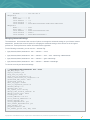
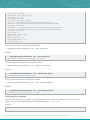
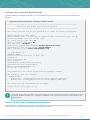
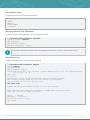
Many of the administrative tools are available via command line. This allows the user to manage user accounts, modify
advanced settings, manage digital certificates, report bugs, update Nessus, and fetch necessary license information. This
command is called nessuscli and is available on all Nessus 6.0 supported platforms.
Overview and Basic Usage
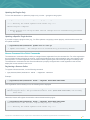
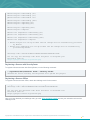
The following table provides instructions for running the Nessus command line tool nessuscli on all supported
platforms. The basic usage for all operating systems are listed below:
Operating System
Command
Linux
# /opt/nessus/sbin/nessuscli <cmd> <arg1> <arg2>
FreeBSD
# /usr/local/nessus/sbin/nessuscli <cmd <arg1> <arg2>
Mac OS X
# /Library/Nessus/run/sbin/nessuscli <cmd> <arg1> <arg2>
Windows
c:\> \Program Files\Tenable\Nessus\nessuscli.exe <cmd> <arg1> <arg2>
Copyright © 2014. Tenable Network Security, Inc. All rights reserved. Tenable Network Security and Nessus are registered trademarks of Tenable Network Security, Inc.
3