1
Note that the examples below at this point will be in the standard Linux format. Please adjust for your
operating system accordingly.
Nessus Command Line Help Commands
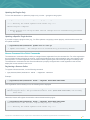
To display the command line usage for nessuscli, type the following:
Windows:
C:\Program Files\Tenable\Nessus>nessuscli help
Unix and Mac OS X (modify path for your installation):
# /opt/nessus/sbin/nessuscli help
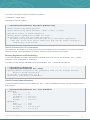
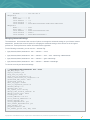
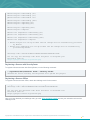
The output will display as follows:
Usage: nessuscli command [options]
Usage: nessuscli command help
Fix Commands:
- fix [--secure] --list
- fix [--secure] --set <name=value>
- fix [--secure] --get <name>
- fix [--secure] --delete <name>
- fix --list-interfaces
- fix --reset
Software Update Commands:
- update
- update --all
- update --plugins-only
- update <plugin archive>
Certificate Commands:
- mkcert-client
- mkcert
- mkcert -q
User Commands:
- rmuser [username]
- chpasswd [username]
- adduser [username]
- lsuser
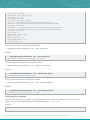
Bug Reporting Commands:
- bug-report-generator
- bug-report-generator --quiet [--full] [--scrub]
Fetch Commands:
- fetch --register <serial>
- fetch --register-offline [<file.rc>]
- fetch --check
- fetch --code-in-use
- fetch --challenge
- fetch --security-center
Copyright © 2014. Tenable Network Security, Inc. All rights reserved. Tenable Network Security and Nessus are registered trademarks of Tenable Network Security, Inc.
4