1
Chapter 4 – Safety
Chapter 3: Troubleshooting
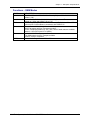
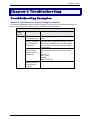
Troubleshooting Examples
Situation A: The modem does not answer through the serial link
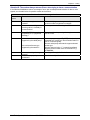
If the Wireless MultiModem does not answer through the serial link upon an attempted transmission of
data or voice signals, see the table below for possible causes and solutions.
Solutions for ‘no connection through serial link’ situation
If the
modem
returns …
(nothing)
Then ask …
Action
Is the modem
powered correctly?
Is the serial cable
properly connected
to the modem and
PC sockets?
Provide a power supply in the range of 5 to
32Vdc.
Connect cable per step 5 of the ”Electrical
Installation and Configuration” procedure. Verify
cable pinout per”RS232 15-Pin Connector Pinout”
table, esp Rx & Tx connections. Verify reception
& transmission.
In communications program, verify that modem
parameters have been set to the values shown
here:
Data bits = 8
Parity = none
Stop Bits = 1
Baud = 115200 bps
Close any such application program.
Is the
communication
program properly
configured?
Is another program
interfering with the
communication
program?
Multi-Tech Systems, Inc. MultiModem GSM/GPRS User Guide
21