1
Reference
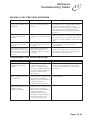
Troubleshooting Tables
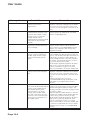
What Is Happening
Possible Reason
13
What to Do
• Remember that a Reminder just reminds you
You set up an event timer, but • You may have set up a
that the program is about to start. An Autothe receiver does not tune to
Reminder but what you should
Tune timer reminds you and tunes the receiver
the channel of the program,
have set up is an Auto-Tune or a
to the program. A PVR timer reminds you,
or does not record the
PVR timer.
tunes the receiver, and starts the hard disk. A
program.
PVR timer can operate only if the receiver
memory has enough space.
You set up an event timer for • You may have set up a timer
a program that is repeated
with an incorrect frequency.
(such as a regularly
scheduled program), but the
timer does not operate for a
showing of the program.
• Remember that a Once event timer operates
just one time. A Mon.-Fri. event timer operates
Monday through Friday on the same channel at
the same time. A Daily event timer does the
same, Monday through Sunday. A Weekly
event timer operates once a week on the same
channel at the same time.
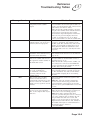
You set up an event timer, but • You may have several timers set
the timer does not operate at
up for the same time and the
all.
event timer you set is at a lower
priority than others
• You may have selected New
Episodes and the timer you set
was for an episode that is not
new.
• Check the Priorities as described on page 9-2
You set up a Vu Pass Timer
and you notice that you have
no space left on your PVR
Event List.
• The Vu Pass Timer may have
included more matching
programs than what you
expected.
• Delete that Vu Pass Timer and begin again. See
page 9-18.
You stop the operation of an
event timer for one showing
of a program that is repeated
(such as a regularly
scheduled program), but the
timer operates for the next
showing.
• Stopping the event timer applies • To stop all operations of a repeated event timer,
you must delete the event timer.
only to the current showing of
Note: The receiver deletes a Once event timer
the program.
when it operates.
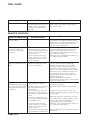
You edit an automatic event
timer. The timer does not
start or does not end
according to the program for
which you set the timer.
• Editing an automatic event timer • If you want an automatic event timer to start
and stop according to a specific program, avoid
converts it to a manual event
editing that event timer.
timer. Such a timer starts and
stops at the times you specify,
not the start and stop times of
any specific program.
You try to set up a manual
displays an Error message.
• You may have tried to set a
manual event timer with invalid
start or stop times.
The receiver does not display • The receiver may not be able to
the program name for a
display a program name for a
manual event timer.
manual event timer.
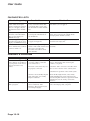
You set an event timer.
The event timer misses the
beginning or the end of a
program.
• Check the Timer Frequency as described on
page 9-2.
• Review the rules on start and stop times for
manual event timers.
• Use the Program Guide or a printed schedule to
find the program name.
• The program may have started a • Use the Start 1 min. early option to start any
little earlier than scheduled, or it event timer one minute early, except for a PayPer-View event.
may have run over its scheduled
• Use a manual event timer to start any event
ending time.
timer at the times you set yourself, except for a
Pay-Per-View event.
Page 13-9