1
User settings
Deactivated memory banks are skipped during
the source selection with the SRC button @.
Notes:
• In the factory default, all AM memory
banks are deactivated.
• If a memory bank is deactivated, the stations stored in this memory bank are retained.
REGIONAL
(only for reception area EUROPE)
Only possible in FM radio mode: Switching
REGIONAL function on or off. Settings: ON, OFF.
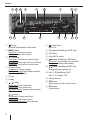
쏅 Press the button 7 to open the submenu.
쏅 Turn the volume control 4 to change between the settings.
SEEK SENS
Setting the sensitivity of station seek tuning.
Settings: LO1 (lowest) – HI6 (highest).
쏅 Press the button 7 to open the submenu.
쏅 Turn the volume control 4 to change between the settings.
PTY
Switching the PTY function on or off. Settings: ON,
OFF.
쏅 Press the button 7 to open the submenu.
쏅 Turn the volume control 4 to change between the settings.
PTY LANG
(only for reception area EUROPE)
Select the language for the display of the programme types. Settings: ENGLISH, DEUTSCH (German), FRANCAIS (French).
쏅 Press the button 7 to open the submenu.
쏅 Turn the volume control 4 to select a language.
AREA (reception area)
Select the reception area for the radio reception.
Settings: EUROPE, USA, S-AMERICA, THAILAND.
쏅 Press the button 7 to open the submenu.
쏅 Press the / button 7 to select a reception area.
쏅 Press the button 7 to set the reception
area.
쏅 Press the button 7 to confirm the selected
reception area.
Making settings in the "DISPLAY"
menu
DIM DAY/DIM NIGHT
Setting the display brightness for the day (DIM
DAY) or the night (DIM NIGHT). Settings: 1 – 16.
쏅 Press the button 7 to open the submenu.
쏅 Turn the volume control 4 to perform the
setting.
If your car sound system is installed as described
in the installation instructions and your vehicle
features the corresponding connection, the display brightness for day and night is switched by
switching the vehicle lighting on or off.
SCROLL
Select the display of scrolling text (e. g. when
displaying MP3 file names) either as single display
or continued display. Settings: 1X (single display),
ON (continued display).
쏅 Press the button 7 to open the submenu.
쏅 Turn the volume control 4 to change between the settings.
21