1
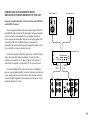
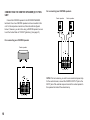
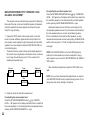
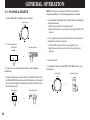
Using an Integrated Amplifier or Stereo Receiver that Does Not
Have PRE OUT and MAIN IN Terminals
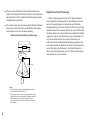
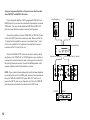
If your integrated amplifier is NOT equipped with PRE OUT and
MAIN IN jacks, this unit must be connected to the amplifier or receiver
TAPE jacks. This unit provides additional TAPE PB and REC OUT
jacks so you will still have a place to connect your tape deck.
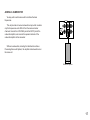
Main Speaker R
Main Speaker L
Connect the amplifier or receiver TAPE REC (or TAPE OUT) jacks
to this unit’s INPUT jacks with a stereo pin cable. Make sure that the
“L” output from the amplifier or receiver is connected to the “L” input
on this unit, and that the “R” output from the amplifier or receiver is
connected to the “R” input on this unit.
Connect the MAIN OUTPUT jacks on this unit to auxiliary (AUX)
input jacks, or the TAPE PLAY (or TAPE IN) jacks on your amplifier or
receiver with a second stereo pin cable—making sure to connect the
left and right channels correctly. Connect the MAIN speakers to the
speaker output terminals of the amplifier or receiver.
Integrated Amp
Tape Rec or Tape Out
INPUT
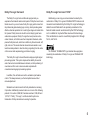
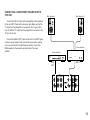
NOTE: If your system includes a tape deck which has been displaced
by connecting this unit to the TAPE jacks, reconnect your tape deck to
this unit’s TAPE PB and REC OUT jacks. REC OUT from this unit
goes to the INPUT jacks on your tape deck, and this unit’s TAPE PB
jacks should be connected to the tape deck’s OUTPUT jacks.
AUX or Tape Play (or Tape In)
TAPE
OUTPUT
-10dB 0dB
OUTPUT
INPUT
Tape Deck
12