1
CHAPTER 6: TRAINING
TRAINING with PowerBeam PRO using Manual WORKOUTS
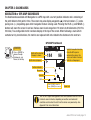
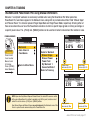
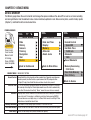
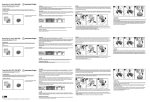
Manual or “unscripted” workouts are exclusively available when using the PowerBeam Pro. When paired to a
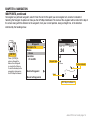
PowerBeam Pro, two choices appear in the Workouts menu, along with any named workout files. Titled “Manual Slope”
and “Manual Power,” the choices represent Target Slope Mode and Target Power Mode, respectively. Entering either of
these areas allows the user to set the PowerBeam resistance to mimic a specific slope (grade or incline) percentage or
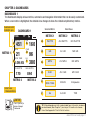
a specific power value. The +[PLUS] and -[MINUS] buttons can be used to increment or decrement the resistance value.
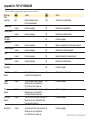
FROM DASHBOARD
9:34A
9:34A
Training
INT
[ENTER]
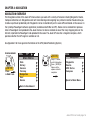
Press & Hold
3 sec. to enter
Menus. Scroll
to Training;
Press •[ENTER] ;
Select Workouts,
Workouts
Auto Interval
Countdown
Back to Main Menu
Manual Slope
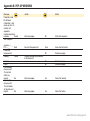
9:34A
TRG SLOPE
Workouts
Select a Workout
Manual Slope
Manual Power
Power Test
My Workout 1
Converted Ride 1
Back to Training
5.0%
Target slope
decrease by 0.5%
WATTS
451
Target slope
increase by 0.5%
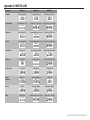
9:34A
Manual Power
TRG PWR
270
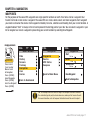
NOTE: Upon selecting Manual Slope or Manual Power, the Joule GPS assumes control
of the paired PowerBeam Pro without a workout script. At this point, resistance must
control the via the device +[PLUS] and -[MINUS] buttons.
Also, Manual Slope and Manual Power are only displayed in the Workouts menu if the
Device is paired to and communicating with a PowerBeam Pro.
Target power
decrease by 10w
WATTS
265
Target power
increase by 10w
Joule GPS User Guide page 27