1
DVCPRO) with a DV Converter connected with a FireWire cable. Connect the outputs from the
converter to the inputs of your video recorder.
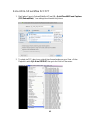
Go to: File > Print to Video and open the movie that you created with MacCaption. Connect the
outputs from your recorder to a TV monitor so you can watch exactly what you are recording.
Play the movie to test your connection to your recorder. Once you have established the
connection (i.e. - you can hear and see the movie through the monitor), cue the movie at the
beginning of the movie. Press record on your recorder and then start playing the movie. When
you play back the video from the DV VCR, the VCR converts the digital video signal to an
analog video signal and puts the embedded closed caption data onto line 21 of the analog video
signal. When a television receives a video signal containing closed captions, it decodes the signal
and displays the captions. To see the captions, your television must be set up to decode the
closed caption CC1 data channel.
Digital Video consists of video that is formatted with the DV-NTSC codec and consists of video
that is 720 pixels across by 480 lines high. With the exception of the closed caption data all other
data in the DV movie is simply copied to the target DV movie. There is no loss of video or audio
quality while adding closed captions to DV.
NLE 720x486 video using an NLE system
MacCaption for NLE systems works by putting a 2-D visual representation of the appropriate
closed caption commands into a QuickTime or AVI movie. This movie file is then imported into
a non-linear editing system, and put on the editing system time line exactly like other video
material. A picture-in-picture effect or a crop effect is then applied to the imported movie to
mask off all but the closed caption image lines, and the NLE system is used to merge the
imported movie with video program material. The resulting video output from the NLE system is
closed captioned. Using this method, no additional hardware encoder is needed to produce closed
captioned video.
This method requires the NLE system to be able to display a line from the visual picture area into
line 21 of the television signal vertical blanking interval (VBI). Video editing hardware from
Avid, Media 100, Blackmagic Decklink, AJA, Matrox and Pinnacle Systems, among others,
supports this capability.
Caption Compatible NLE Systems: For compatible caption compatible NLE systems, check the
chapter Hardware Requirements. For most upto date listing, check the link:
http://www.cpcweb.com/nle/nle-hardware.htm
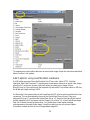
You can caption a 720x486 NLE video in two different ways:
1. add captions to the 720x486 video directly.
2. export a black 720x486 video with closed caption data at the top row and bring that video
to the NLE system and superimpose the black video on top of your video.
67