1
Freeway [A6] ~ Issue 1 ~ Edition 5 ~ 31st March ’03 – 5023
At a glance
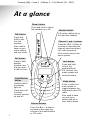
Power button
Press and hold to switch
the handset on or off.
Freeway FM
Talk button
Press and
hold to talk
into the
handset.
Also used to
save current
menu setting
and exit menu.
Headset socket
Lift up the rubber bung
to insert the headset.
Channel + and – buttons
Press the + or – button to
increase or decrease the
channel/subchannel and
FM radio frequency.
Also used to select next
menu options.
Call button
Press to alert
another
handset user
that you want
to talk to them.
Lock button
Press and hold
to lock the
walkie-talkie or
FM channel, the
mode, power and
volume buttons.
Freeway FM
it o
M on
Used to switch
the display
light on.
Press and hold
to switch
channel monitor
on and off.
r
Light/Monitor
button
Vol
Vol
Volume buttons
Press the + or – button to
increase or decrease the
volume of the walkie-talkie
or FM radio.
1
Mode button
Press to enter the
menu mode, to
toggle between the
walkie-talkie and FM
radio.
Also used to save
current menu
setting and go to
next menu option.