1
ProductionVIEW Super Joystick
Overview:
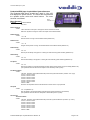
The Vaddio™ ProductionVIEW Super
Joystick is a unique integration joystick
contoller
that
is
based
on
the
ProductionVIEW
series
of
camera
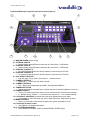
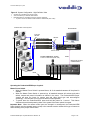
controllers. The Super Joystick has six
individual RS-232C camera control ports for
direct control of PTZ cameras which
eliminates the need for daisy chain control
cabling. The camera control ports are on
RJ-45 connectors which easily connect to
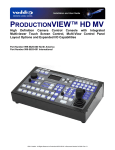
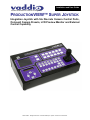
Figure 1: ProductionVIEW Super Joystick
the Vaddio EZCamera™ cabling packages
using a Cat. 5 wiring standard.
Each of the six camera control ports will auto-configure based on the robotic PTZ camera system
connected to that port upon boot up. Whether it is a Vaddio, Sony® or Canon® PTZ camera system the
ProductionVIEW Super Joystick senses the cameras and provides for seamless control of the camera
functions. Each of the six cameras attached has been supplied with 12 internally stored camera presets
effectively removing the internal preset limitations of the camera. Each of the six cameras attached can
also be adjusted individually for the operating environment with adjustments for auto/manual focus,
auto/manual brightness, backlight compensation and one push automatic white balance.
The ProductionVIEW Super Joystick has two rows of six external control switches which can be used in a
variety of ways. These switches are tied to trigger outputs and can be used to control external video
switchers with contact closures or tally lights for studio applications. The Super Joystick also has
provision for external control of select HD switchers/mixers with built-in RS-232 codes in the system
menu. And like the ProductionVIEW FX, the ProductionVIEW Super Joystick console has a 4” LCD
preview monitor is built-in. Overall, the ProductionVIEW Super Joystick is a unique and advanced
camera controller that is unmatched in today’s market for functionality, convenience and value.
Intended Use:
Before operating the Vaddio ProductionVIEW Super Joystick, please read the entire manual thoroughly.
The system was designed, built and tested for use indoors, and with the provided power supply and
cabling. The use of a power supply other than the one provided or outdoor operation has not been tested
and could damage the camera and/or create a potentially unsafe operating condition.
Save These Instructions:
The information contained in this manual will help you install and operate your Vaddio ProductionVIEW
Super Joystick. If these instructions are misplaced, Vaddio keeps copies of Specifications, Installation
and User Guides and most pertinent product drawings for the Vaddio product line on the Vaddio website.
These documents can be downloaded from www.vaddio.com free of charge.
Important Safeguards:
Read and understand all instructions before using. Do not operate any device if it has been dropped or
damaged. In this case, a Vaddio technician must examine the product before operating. To reduce the
risk of electric shock, do not immerse in water or other liquids and avoid extremely humid conditions.
Use only the power supply provided with the ProductionVIEW system.
Use of any unauthorized power supply will void any and all warranties.
UNPACKING:
Carefully unpack and identify the following parts from the packaging.
• One (1) ProductionVIEW Super Joystick Camera Control Console
• One (1) Vaddio PowerRite 18 VDC, 2.75A Power Supply
• One (1) Vaddio AC Cord Set
• Documentation and Manuals
ProductionVIEW Super Joystick Manual 341-565 Rev. B
Page 2 of 16