1
Listening to the iPod (continued)
■
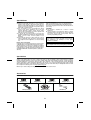
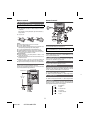
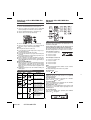
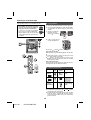
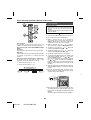
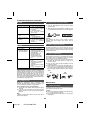
To insert iPod adaptor
1 Press the ON/STAND-BY button to turn the power on.
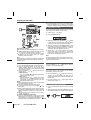
2 Insert the iPod adaptor into the iPod dock and connect
M I NI CO M P O NE NT SY S T E M
CD-DH790
ON/STAND-BY
your iPod.
FUNCTION
ON/STAND-BY
iPod (bottom)
VOL
iPod
Dock connector
CD
USB
iPod adaptor
iPod dock
iPod connector
■
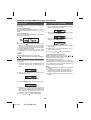
iPod playback
1 Press the ON/STAND-BY button to turn the power on.
2 Press the iPod button on the remote control or
■
FUNCTION button repeatedly on the main unit to
select iPod function.
3 Insert iPod unit in iPod dock of main unit.
4 Press the / button to start playback.
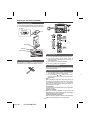
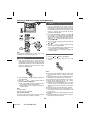
To remove iPod adaptor
Insert the tip of a screwdriver (“–” type, small) into the
iPod adaptor hole as shown and lift upward to remove.
■
To disconnect iPod
Simply remove the iPod from the iPod dock. It is safe to do
so even during playback.
■
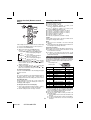
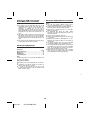
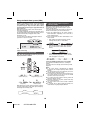
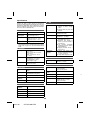
Navigating the iPod menus
1 Press the MENU button to view the menu on iPod unit.
Press it again to go back to previous menu.
or ) button on the remote
control to select an item on the menu and then press
ENTER button.
2 Use the TUNING (
Note:
When navigating the iPod menus with remote control, do
not operate any of the buttons on the iPod unit. The volume
level is adjusted by pressing the VOL (+ or –) button on the
main unit or the remote control. Adjusting the volume on
the iPod unit gives no effect.
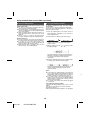
iPod operation:
The operations described below depend on the generation
iPod you are using.
System on operation:
When the main unit is powered on, the iPod unit will
automatically power on when docked in the unit (including
TIMER function/exclude USB function).
System off (stand-by operation):
When the main unit is turned to stand-by mode, the docked
iPod unit will automatically turn to stand-by mode.
9
04/1/28
CD-DH790NH EN
1
2
3
4
5
6
7
1
2