1
CONTENTS
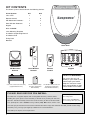
KIT CONTENTS
INTRODUCTION AND OVERVIEW
4
PASSIVE INFRA-RED (PIR) MOVEMENT
DETECTORS
13
5
Positioning the PIR Detectors
13
System Arming
5
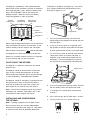
Installing and Configuring the PIR Detectors
14
Entry/Exit Delay
5
Testing the PIR Detectors
15
Alarm Lockout
5
Tamper Protection
5
Jamming Detection
5
Positioning the Door / Window Detectors
16
Battery Monitoring
5
Installing and Configuring the Door / Window
Detectors
16
User Access Code
5
Testing the Door / Window Detectors
18
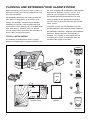
PLANNING AND EXTENDING YOUR
ALARM SYSTEM
Typical Installation
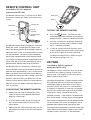
REMOTE CONTROL UNIT
(Included in SL1 kit / Optional Accessory
for SL2 kit)
6
6
7
MAGNETIC DOOR / WINDOW DETECTORS
16
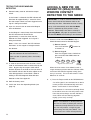
ADDING A NEW PIR OR MAGNETIC (MAG)
DOOR / WINDOW CONTACT DETECTOR
TO THE SIREN
18
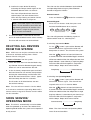
DELETING ALL DEVICES FROM
THE SYSTEM
19
SIREN SERVICE / OPERATING MODE
19
General Information
7
Configuring the Remote Control
7
Testing the Remote Control
7
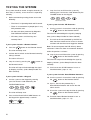
TESTING THE SYSTEM
20
7
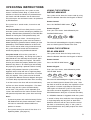
OPERATING INSTRUCTIONS
21
KEYPAD
(Included in SL2 kit / Optional Accessory
for SL1 kit)
Positioning the Keypad
8
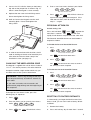
Installing and Configuring the Keypad
8
Changing the User Access Code
9
Personal Attack / PA
9
Resetting to Factory Defaults
9
EXTERNAL SOLAR SIREN
10
General Information
10
Positioning the Solar Siren
10
Installing and Configuring the Solar Siren
10
Power-up of the Solar Siren
11
Adding a new Remote Control or Keypad
to the Solar Siren
12
Mounting the Solar Siren on to the wall
13
Arming the System in Instant-Arm Mode
21
Arming the System in Delay-Arm Mode
21
Disarming the System
22
Personal Attack (PA) Alarm
22
Device Tamper
22
Siren Service Mode
22
Siren Operating Mode
22
Battery Monitoring
22
MAINTENANCE
24
TROUBLE SHOOTING
25
EXTENDING YOUR ALARM SYSTEM
27
COMPONENT SPECIFICATION
28
3