1
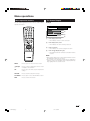
Menu operations
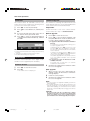
DNR (Digital Noise Reduction)
TV/DTV/AV only
Input Select
Menu Operation: A (page 12)
Menu Operation: A (page 12)
Produce a clearer image. (Off, High, Low)
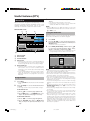
For setting the signal type of external equipment.
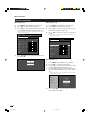
HDMI Setup
AV only
HDMI (High-Definition Multimedia Interface) terminal
selection.
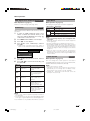
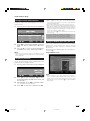
1
2
3
4
To watch an HDMI equipment image, select
“EXT5” or “EXT6” (the terminal which you are
using) from “INPUT SOURCE” menu using b
on the remote control unit or TV.
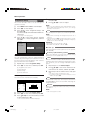
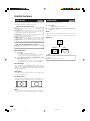
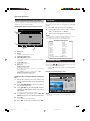
Press MENU and the MENU screen displays.
Press c/d to select “Option”.
Press a/b to select “HDMI Setup”, and then
press OK.
• “HDMI Setup” is displayed only when “EXT5” or
“EXT6” is selected from the INPUT SOURCE menu.
MENU
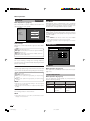
[Option ... HDMI Setup]
Option
Audio Only
DNR
[Off]
HDMI Setup
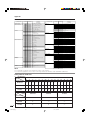
Input source
EXT 1
Signal type
Y/C, CVBS, RGB
EXT 2
Y/C, CVBS, RGB
EXT 3
EXT 4
Rear
CVBS, S-VIDEO
Side
CVBS
PC (RGB), COMPONENT (Y, PB, PR)
NOTE
• If no (colour) image displays, try to change the other
signal type.
• Check the operation manual of the external equipment
for the signal type.
• TV, EXT5 and EXT6 are not displayed in Input Select.
• If both CVBS and RGB signals are input to EXT 1 or EXT 2
using a SCART cable, the TV may output an RGB signal
even though you have designated CVBS for the respective
terminal. This happens due to the setting of your external
equipment.
• EXT 3 has “Rear” and “Side” terminals. Confirm which
terminal you have connected, and select the appropriate
terminal under “Input Select”. When using S-VIDEO, select
“Rear” for EXT3.
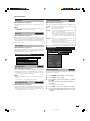
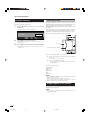
Colour System
TV/AV only
5
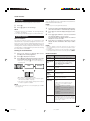
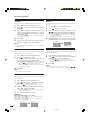
Press a/b to select the desired item, and then
press OK.
Menu Operation: A (page 12)
6
Press a/b/c/d to select the desired setting, and
then press OK.
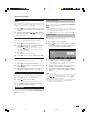
You can change the colour system to one that is
compatible with the image on the screen. (AUTO, PAL,
SECAM, NTSC3.58, NTSC4.43, PAL-60)
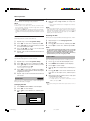
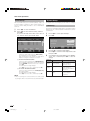
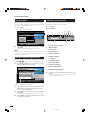
HDMI Setup
items
Selectable items
Description
Signal
Type*
RGB/YCbCr 4:4:4/
YCbCr 4:2:2
Select the video signal
type from the HDMI
terminal.
Colour
Matrix*
ITU601/ITU709
Select the internal colour
space conversion method
when an RGB signal is
input.
Dynamic
Range*
Normal/
Enhanced
Select the signal amplitude
range. Usually, select
“Normal”.
Auto View Disable/Enable
Set whether or not to use
WIDE MODE based on
signal recognition,
including an HDMI signal.
Audio
Select**
Select “Digital” for audio
signal via the HDMI
terminal. Select “Analogue”
for audio signal via the
AUDIO jack.
Digital/Analogue
NOTE
• Factory preset value is “AUTO”.
• If “AUTO” is selected, colour system for each channel is
automatically set. If an image does not display clearly,
select another colour system (e.g. PAL, SECAM).
• “NTSC3.58”, “NTSC4.43” and “PAL-60” cannot be
selected in TV tuner mode.
NOTE
• Refer to your external equipment operation manual for
the signal type.
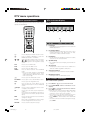
• Items marked * may be greyed out (with 4) depending
on the type of signal input from the external equipment.
• Item marked ** is only available when EXT5 is selected.
19
LC-32RD2E_GB_b
19
07.2.1, 5:15 AM