1
Radio Systems, Inc.
CT-2002 Manual
To Adjust The Analog Clock Time (using a CT-2002
Master or GPS Driver)
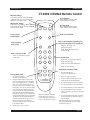
1. Put the Master in set mode by pressing and holding the START and STOP buttons together for 3 seconds. The digital display will flash.
2. To add a second, push and release the STOP button. To subtract a second, push
and release the RESET button.
3. To add an hour (for Daylight Savings Time) push and hold the STOP button for
3 seconds. The analog clocks will run at double speed for exactly 1 hour. To
subtract an hour (for Standard Time) push and hold the RESET button for 3
seconds. The analog clocks will stop running for exactly 1 hour, then start
again.
4. Push the START button to resume normal digital clock operation.
Notes:
1.
Adjustments made via the CT-2002 Master driver will effect any digital clocks
downstream.
2.
On systems that utilize the AMD-1 analog clock driver, all time adjustments
should be made via this unit. Consult the AMD-1 manual for adjustment
instructions.
3.
Daylight Savings and Standard Time adjustments are made automatically to
all digital and analog clocks connected to the GPS Master driver. The user
must manually initiate these functions if no GPS receiver is utilized.
Page 19