1
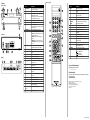
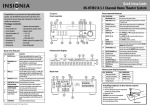
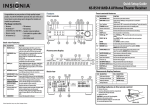
Features Front controls Remote control # 1 ITEM ON/STANDBY button 2 3 STANDBY indicator BLUETOOTH indicator 4 5 6 Remote sensor Display MEMORY button 7 8 TUNE/PRESET button / (function) buttons Back view Display 9 INPUT button 10 11 HEADPHONE jack AUX 3 jack 12 13 14 15 VOLUME knob AC power cord AM and FM antenna jacks Audio input jacks 16 Audio output jacks 17 18 Speaker terminals Display 19 Headphone indicator 20 21 22 23 STEREO indicator TUNE indicator SLEEP indicator PRESET indicator 24 MEM (station memory) indicator Preset station indicator 25 DESCRIPTION Press to turn on your stereo receiver. Press again to put the stereo receiver in standby mode. Lights red when your stereo receiver is in standby mode. Blinks when your stereo receiver is in pairing mode and “PAIRING” is shown on the display. Lights when your stereo receiver is connected via Bluetooth, and “CONNECTED” is shown on the display. Receives the signal from the remote control. Provides information about the receiver. Press to save a station preset. Press and hold to automatically search for FM stations and store them in memory. Press to toggle between tune and preset mode. Does one of the following, depending on the mode selected: • In TUNE mode, tunes the receiver up or down or searches for the next or previous station. • In MEMO mode, stores stations to the selected preset number. • In PRESET mode, selects the preset station you want. • In BLUETOOTH playback mode, skips or searches forward or back. Press to cycle through the available input options. Options include: FM, AM, CD, AUX 1, AUX 2, AUX 3, BT AUDIO. Plug 1/4" stereo headphones into this jack. Connect a portable audio device, such as an MP3 player, to this jack. Turn to increase or decrease the volume. Plug this cord into an AC power outlet. Connect the AM and FM antennas to these jacks. Connect audio input devices to these jacks to play their audio through your receiver. Connect devices like an audio recorder to record audio played through your receiver. Connect speakers to these terminals. Shows input, frequency, volume level, and operating information. Lights when in Headphone mode and headphones are connected. Lights when in FM stereo mode. Lights when tuned to a radio station. Lights when the sleep timer is active. Lights to indicate that the receiver will scan through preset radio channels when tuning. Lights when setting preset channels. # 1 2 ITEM Number PRESET 3 Input 4 5 6 7 8 9 TUNER PRESET / TUNE / MEMO BALANCE L and R BLUETOOTH BASS –/+ ON/STANDBY 10 11 12 SPEAKER A and B DIMMER SLEEP 13 14 MO/ST MUTE 15 16 VOLUME +/– Bluetooth playback 17 TREBLE –/+ DESCRIPTION Press to enter a preset number. Press to scan preset stations in order. Press again to stop scanning. Press to select audio source. Options include: CD, AUX 1, AUX 2, or AUX 3. Press to select the tuner as the audio source. Press to tune the radio to the previous or next preset station. Press to tune the radio to a lower or higher frequency. Press to memorize a preset station. Press to adjust the balance to the left and right. Press to select Bluetooth audio as the input source. Press to decrease or increase the bass. Press to turn your receiver on and to set your receiver to standby mode. Press to switch to speaker A or B. Press to adjust the brightness of the display (On, Dim, Off). Press to cycle through the available sleep timer intervals (from 10 to 90 minutes). Press to switch between mono and stereo mode. Press to mute the sound from your receiver. Press again to restore the sound. Press to increase or decrease the volume. Press to control the playback from a Bluetooth device. - Previous/Rewind button - Play/Pause button - Next/Fast Forward button Press to decrease or increase the treble. One-year limited warranty Visit www.insigniaproducts.com for details. Contact Insignia: For customer service, call 1-877-467-4289 (U.S. and Canada) or 01-800-926-3000 (Mexico) www.insigniaproducts.com INSIGNIA is a trademark of Best Buy and its affiliated companies. Registered in some countries. Distributed by Best Buy Purchasing, LLC 7601 Penn Ave South, Richfield, MN 55423 U.S.A. ©2014 Best Buy. All rights reserved. Made in China Shows preset number selected. V1 ENGLISH 14-0120