1
Basic adjustment
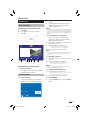
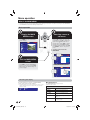
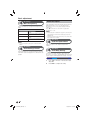
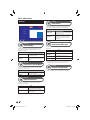
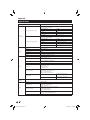
7 Select
Library
E Display/close the LIBRARY screen
Press the LIBRARY button on the remote
control or select Library from the Main Menu.
9
BBC ONE
MOTD Live: Spain v Switzerland
Gary Lineker introduces live coverage from Durban. Spain are favourites
to win a first-ever World Cup. Switzerland are appearing in their ninth
finals. Also in HD. [S]
AD
001 BBC ONE
Breakfast
Deal or No Deal
The Simpsons
EastEnders
Escape to the Country
Royal Ascot
MOTD Live: Spain v Switzerland
Stop
GUIDE
Guide
SUB
Channel 4
BBC ONE
BBC ONE
15/06
15/06
15/06
15/06
16/06
68% Remaining
Recorded
Viewed
Recorded
Failed
Recorded
BBC ONE
BBC ONE
16/06
16/05
Recorded
Recorded
BBC ONE
Channel 4
Protect
Schedule
Preview
Delete
OK
Select
8 Exit Menu
Press the EXIT button on the remote control
to exit the current screen.
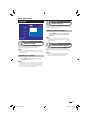
9 Hours Remaining
Library
Wed 16 Jun 2010
2:38pm - 2:39pm
Press the OK button on the remote control to
make a selection.
This displays the available space on the Hard
Disk Drive for recording.
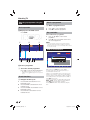
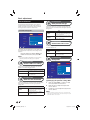
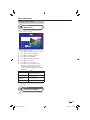
Scheduled Recordings
E Display/close the Scheduled
Recordings screen
EXIT
Exit Menu
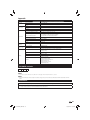
Select Scheduled Recordings from the Main
Menu.
Scheduled Recordings
1 2 3 4 5 6 7 8
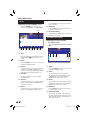
1 Stop
This stops playback of a previewed recording,
selected with the H button on the remote
control.
2 Guide
Wed 16 Jun 2010
5:15pm - 6:00pm
BBC ONE
The Weakest Link
Nine contestants paly as a team to win up to 10,000 pounds. However, only one takes the prize money
home; round by round the contestants vote off the weakest link. [S]
SUB
S
001 BBC ONE
The Weakest Link
The Simpsons
BBC ONE
Channel 4
16/06
16/06
68% Remaining
Scheduled
Scheduled
S
S
S
S
Channel 4 News
Channel 4
16/06
Scheduled
S
S
S
S
S
S
S
S
S
S
1 2 3
Coronation Street
ITV1
16/06
Scheduled
South Africa Walks
BBC TWO
17/06
Scheduled
South Africa Walks
BBC TWO
BBC ONE
17/06
17/06
Scheduled
Scheduled
Breakfast
GUIDE
Guide
Series
Delete
4 5
EXIT
Exit Menu
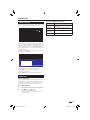
Press the GUIDE button on the remote control
to view the programme guide.
3 Protect
This function allows you to protect a selected
recording, selected with the RED button on
the remote control. A P will appear on the right
hand side in the selected programme row.
4 Schedule
This function takes you to the Scheduled
Recordings menu.
5 Preview
This function allows you to preview a selected
recording, selected with the YELLOW button
on the remote control.
6 Delete
This function allows you to delete a selected
recording, selected with the BLUE button.
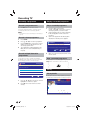
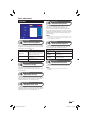
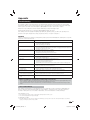
1 Guide
Press the GUIDE button on the remote control
to view the programme guide.
2 Series
This function lets you select a repeated
scheduled recording for recording as a series
of programmes. This is selected with the
GREEN button on the remote control.
3 Delete
This function allows you to delete the selected
scheduled recording. This is selected with the
BLUE button on the remote control.
4 Exit Menu
Press the EXIT button on the remote control
to exit the current screen.
5 Information Row
This row gives the details of the scheduled
recording, including the programme title, the
channel number, the date of the programme
and its current status.
26
TU-T2HR32_GB.indd 26
29/06/2010 15:16:44