1
Installation and Operation Manual
DC4 Desktop Charger for d81, d62, and d41
1
TD 92481GB
Introduction
This document describes how to install, configure and operate the Desktop Charger DC4. The
DC4 is an advanced charger equipped with a USB port, making it possible to connect it
directly to a PC for the purpose of upgrading or configuring the DC4 itself or a handset
placed in the charger. The DC4 also has two Ethernet ports, enabling upgrading and
configuring over a LAN of a portable placed in the charger.
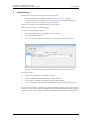
The USB port is used when the DC4 is connected to a PC running the Portable Device
Manager (PDM), Windows Version. The PDM or the Integrated Wireless Messaging and
Services (IMS2) can be used to upgrade the software and to configure parameters in the
DC4 as well as in a handset placed in the DC4.
The DC4 supports easy replacement, that is replacement of a faulty handset via the handset
display and does not involve PDM or IMS2.
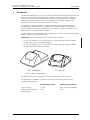
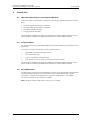
IMPORTANT: There are different revisions of DC4 for d81 available:
•
001
•
Art. No.: DC4-AAAB/rev. 1A (or higher revision) - desktop charger for d81 Standard
handsets. Not for EX classified d81 handsets.
Art. No.: DC4-AAAB/rev. 3A (or higher revision) - desktop charger for d81 Standard
handsets and EX classified d81 handsets.
DC4 for d62/d41
DC4 for d81
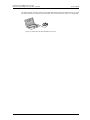
Figure 1. DC4 Desktop Chargers.
The Ethernet ports makes it possible to connect several DC4’s to the same LAN.
This document is intended as a guide for installation, maintenance, operation and
troubleshooting purposes.
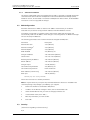
Desktop Charger DC4
Desktop Charger Adapter
Supply voltage
5 V DC
100 - 240 V AC, (50-60Hz)
Max current consumption
when charging
2.0 A
0.4 A
17 December 2010 / Ver. D
1