1
Listening to the iPod, iPhone or iPad
(continued)
Listening to a CD or MP3/WMA disc
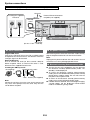
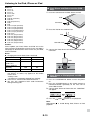
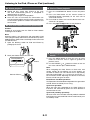
■■ To disconnect iPod, iPhone or iPad
Simply remove the iPod or iPhone from the docking
station or iPad connector from USB terminal. It is safe to
do so even during playback.
Caution:
●● Stop button ( ) at main unit is invalid during iPod
function.
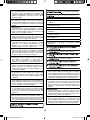
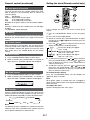
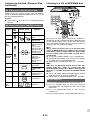
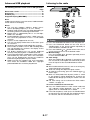
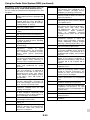
■■ Various iPod, iPhone and iPad functions
Function
Main
unit
Dock/
USB
Play
PAIRING
____
Repeat
Cursor
Up/
Down
BLUETOOTH
Press to select the
iPod menu.
Fast
forward/
reverse
Enter
USB
____
Track
up/
down
Menu
Dock
Operation
Press in the pause
mode.
Press in the
playback mode.
Press in the
playback or pause
mode.
If you press the
button in the pause
mode, press the
/ button to start
the desired track.
Press and hold
down in the
playback mode.
Release the
button to resume
playback.
Press to toggle
repeat mode.
Press and hold
to toggle shuffle
mode.
Press to view the
iPod menu during
iPod function.
Press to confirm
the selection.
Pause
Shuffle
Remote control
____
____
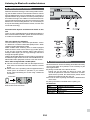
This system can play back a standard CD, CD-R/RW in
the CD format and CD-R/RW with MP3 or WMA files, but
cannot record on them. Some audio CD-R and CD-RW
discs may not be playable due to the state of the disc or
the device that was used for recording.
MP3:
MP3 is a form of compression. It is an acronym which
stands for MPEG Audio Layer 3. MP3 is a type of audio
code which is processed by significant compression
from the original audio source with very little loss in
sound quality.
●● This system supports MPEG 1 Layer 3 and VBR files.
●● During VBR file playback, time counter in the display
may differ from its actual playback time.
●● Bitrate which is supported by MP3 is 32 ~ 320 kbps.
WMA:
WMA files are Advanced System Format files that
include audio files which are compressed with
Windows Media Audio codec. WMA is developed by
Microsoft as an audio format file for Windows Media
Player.
●● “MP3” and “WMA” indicator will light up after the unit
reads information on an MP3 or WMA disc.
●● Bitrate which is supported by WMA is 64 ~ 160 kbps.
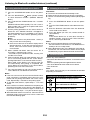
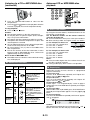
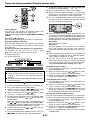
■■ Disc playback
1 Press the ON/STAND-BY button to turn the power on.
2 Press the CD/USB button on the remote control or
FUNCTION button repeatedly on the main unit to select
CD function.
3 Press the OPEN/CLOSE button to open the disc
compartment.
4 Place the disc in the disc compartment, label side front.
E-12